
24/7 全天候客户支持

免费退货

当日/次日达

品质保障

开启新人专享福利: 全场免邮 | 低至 2 折 | 免费试用 30 天 JoyPlus 会员
下载 Joybuy
As our digital lives expand, from treasured family photos and critical work documents to vast game libraries, the storage on our computers and consoles can fill up surprisingly quickly. An external hard drive is a straightforward solution, providing the extra space you need for backups, archiving or simply taking large files on the go.
However, the market is filled with options, and choosing the right one depends entirely on your specific needs. Are you a gamer needing fast load times, a creative professional transferring huge video files or someone looking for a simple and affordable backup solution? This guide is designed to help you understand the key features and find a suitable drive for your requirements.
Navigating specifications can be confusing. Here are a few practical points to consider that will help you narrow down your choice.
The first major decision is between a Solid-State Drive (SSD) and a traditional Hard Disk Drive (HDD).
Capacity is measured in gigabytes (GB) and terabytes (TB), where 1TB equals 1,000GB. A 2TB external hard drive is a popular and versatile choice, offering ample space for most users' documents, photos and a good number of games or films. If you are a videographer, a serious data archivist or want to back up multiple computers, looking at capacities of 4TB, 6TB or even higher might be more appropriate.
Check the connection type. Most modern drives use USB-C, offering fast speeds and a reversible connector. A USB-C hard drive is a future-proof choice that works with the latest laptops, tablets and Macs. Many also come with an adapter or a separate cable for older USB-A ports.
For those who travel frequently or work in the field, a rugged portable drive is worth considering. These models often feature shock-absorbent casings and sometimes have IP ratings for water and dust resistance, providing extra peace of mind that your data is protected against the elements.
Based on a combination of performance, capacity and user-specific features, here are our recommendations to help you find a drive that fits your needs.

Why It Stands Out: The Samsung T7 is a benchmark for portable SSDs, combining exceptional speed with a sleek, pocket-sized design. It uses PCIe NVMe technology to achieve read/write speeds of up to 1,050/1,000 MB/s, making file transfers incredibly quick. Its solid aluminium body offers drop resistance from up to 2 metres, and it includes optional AES 256-bit hardware encryption for securing sensitive data.
Pros:
Who is it for? Professionals, content creators and anyone who values speed, security and portability in a single package. It's an excellent all-rounder for work and general use.
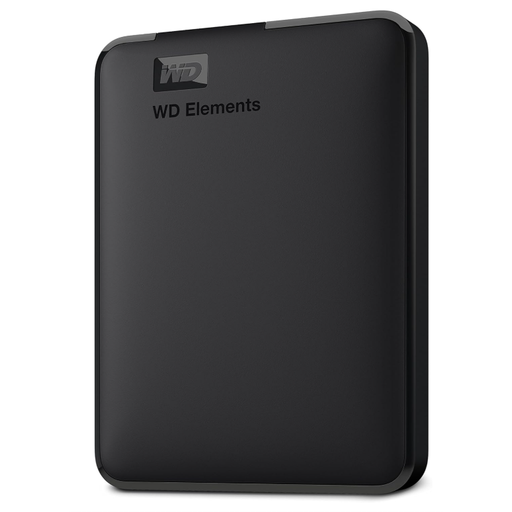
Why It Stands Out: When sheer storage capacity is the priority, the WD Elements Portable delivers. This drive offers a colossal 6TB of space in a simple, reliable package. It’s a plug-and-play HDD that is pre-formatted for Windows, making it an incredibly straightforward solution for expanding your PC’s storage or creating comprehensive backups. It’s powered directly through the USB 3.0 cable, so there’s no need for a bulky power adapter.
Pros:
Who is it for? Home users, students and digital collectors who need maximum storage for media libraries, document archives and full system backups without the premium cost of an SSD.
View WD Elements 6TB on Joybuy

Why It Stands Out: Officially licensed for the PlayStation 5, this gaming SSD from SanDisk is built to handle the demands of modern gaming. It provides 2TB of high-speed storage, perfect for archiving PS5 games and playing PS4 titles directly from the drive. Its key feature is its durability; with an IP65 rating for water and dust resistance and 3-metre drop protection, this rugged drive is ready for travel to a friend's house or a gaming tournament.
Pros:
Who is it for? Dedicated PS5 and PC gamers who need to expand their library with a fast, reliable and exceptionally durable external SSD that can withstand an active lifestyle.
View SanDisk Extreme 2TB for PS5 on Joybuy
If the recommendations above aren't quite what you're looking for, or if you'd like to compare different capacities and brands, there are many other models available. From ultra-compact drives to high-capacity desktop solutions, you can find a drive that perfectly matches your budget and requirements.
Explore our complete collection of SSDs for computers to find the right fit for your needs.
An SSD (Solid-State Drive) has no moving parts, making it much faster, more durable and quieter than a traditional HDD (Hard Disk Drive). HDDs use spinning disks, which makes them slower but allows them to offer much larger storage capacities for a lower price. An SSD is better for performance, while an HDD is better for mass storage on a budget.
You can use most external USB hard drives to store and play PS4 games on a PS5. However, due to their size and speed requirements, PS5 games can only be stored on an external drive, not played directly from it. You must transfer them back to the console's internal storage to play. For this reason, a fast portable SSD is highly recommended to make those transfers as quick as possible.
This depends on your usage. For general use like storing documents, a moderate photo collection and backing up your laptop, a 1TB or 2TB external hard drive is usually sufficient. If you are a gamer with a large library, a photographer shooting in RAW or a videographer working with 4K footage, you should consider 4TB, 6TB or more to avoid running out of space.