For a large photo library kept mostly at home, consider a desktop external hard drive; choose a portable SSD if you regularly carry the copy or transfer files between computers, or network storage if several household devices need a shared destination. Measure files after downloading them, leave room for growth and keep another independent copy: neither one external drive nor one network device is a complete backup plan.
Who needs which setup?
Growing household archive keepers
If years of photos and videos will stay at home, measure the downloaded collection and focus on capacity for the files you have and expect to add. A desk-based drive may suit this routine better than one you intend to carry daily.
Frequent transfer and travel users
If you move large batches between computers or take a copy away from home, check the connection on each computer as well as the drive’s capacity and portability.
Multi-device home-library managers
If several household devices need a shared local destination, network storage may suit you, provided you are willing to set it up at the router and maintain a separate backup.
What matters when choosing storage?
If your library is in Amazon Photos, test how you will download and inspect a batch before sizing a drive. Then choose a storage format for where you will use the copy, and decide where its independent backup will live.
Desktop external hard drive
Consider it when: A growing photo and video archive will stay mainly at a desk; Seagate’s Expansion Desktop range includes capacities from 4 TB to 30 TB.
Trade-off: A mains-powered desktop drive is less convenient to carry, and its labelled capacity is not the amount of space an operating system will show as available.
Portable external SSD
Consider it when: You frequently move the local copy or transfer downloaded batches between computers.
Trade-off: Check that the chosen capacity fits the library. Samsung’s T7 Shield range, for example, extends to 4 TB, and its quoted maximum transfer speeds depend on the host and connection.
Home-network storage
Consider it when: Several household devices need a shared local destination and you are prepared to manage it.
Trade-off: Synology’s BeeStation Plus connects to a router by Ethernet for setup. Network storage still needs a backup at a separate destination.
| Concern |
What to check |
Who this matters to |
| Usable capacity and growth |
Measure downloaded photos, videos and separate edited copies; leave space for growth. Compare usable space, not just the labelled TB figure. |
I want years of photos and videos to fit without replacing the drive as the collection grows. Around 33% of consumers put capacity and growth first. |
| Download and file checks |
Test a representative batch on the intended computer; inspect its size, file types and organisation before planning larger downloads. |
If my collection is in the cloud, I need a repeatable way to retrieve files and check that they open. Around 27% of consumers make the download workflow their primary concern. |
| Independent backup |
Plan a second destination and test that you can open files recovered from it. Do not rely on the first drive or network device alone. |
I do not want a failed or lost device to take the only local copy of family photos with it. Roughly 27% of consumers put independent backup first. |
| Portability and local transfers |
Check the ports and cable you will use, as well as capacity; a drive’s quoted speed does not determine cloud-download speed. |
When I carry a copy between computers, handling and local transfer time matter to my routine. About 13% of consumers prioritise portable transfers. |
Mistakes to avoid
-
Treating one drive as the whole backup plan
A drive can fail, be lost or become corrupted. The Cybersecurity and Infrastructure Security Agency’s 3-2-1 guidance calls for three copies, on two media types, with one copy offsite.
Decide where your second backup and offsite copy will live before removing another copy of the library.
-
Choosing capacity from a photo count or TB label
Videos, edited copies and new files add to the space needed. Seagate explains that drive makers state TB in decimal units, while a computer may report capacity using a different convention.
Measure downloaded files, allow room for growth and plan the capacity of another backup separately.
-
Expecting a fast SSD to speed up a cloud download
Samsung’s quoted T7 Shield speeds depend on a compatible host, cable and connection. They do not describe how quickly Amazon Photos will deliver a batch to your computer.
Test the cloud download on the computer you will use; choose an SSD for the local transfers and portability you actually need.
-
Deleting files before passing on an old drive
Recycle Your Electricals advises permanently removing personal data before a device is reused or recycled; ordinary file deletion is not a secure-erasure plan.
Back up files you want to keep, follow an appropriate secure-erasure process for the drive, then use a suitable electrical-recycling route.
Relevant brands to consider
Seagate
Its Expansion Desktop line is relevant to a desk-based photo archive where nominal capacity is a leading consideration.
- Seagate lists Expansion Desktop variants from 4 TB to 30 TB.
- Check the exact model and available space: the capacity reported by a computer can differ from the labelled TB figure.
Samsung
Its portable T7 Shield SSD line is relevant when a local copy is carried or transferred frequently.
- Samsung lists 1 TB, 2 TB and 4 TB T7 Shield versions.
- Samsung’s stated maximum speeds require a compatible host, cable and UASP; its controlled-condition durability claims are not a substitute for a separate backup.
Synology
Its BeeStation Plus is a home-network option for bringing files from several devices into one local destination.
- Synology lists 4 TB and 8 TB nominal-capacity versions and describes connections to computers, cloud accounts and external drives.
- Setup requires a router connection by Ethernet. Synology advises backing up to another destination because network storage can still suffer data loss.
Joybuy storage choices
These desktop and portable drives are options for holding a local photo-library copy. Choose capacity against your measured files and growth plans; keep a separate backup whichever drive you use.
 No image available
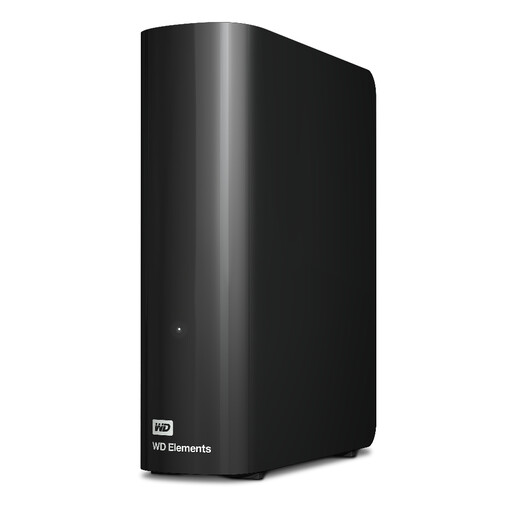
Western Digital 16TB WD Elements Desktop hard drive
Consider this desk-based drive for a growing local archive if the downloaded library fits with room to spare.
Plan for a mains outlet and check usable space rather than treating the labelled 16TB as space entirely available for files.
View on Joybuy
 No image available
Western Digital My Passport Ultra 5TB portable hard drive, Blue
Consider this portable hard drive if you need to carry a local copy and your measured collection leaves sufficient room within 5TB.
If you use a Mac, check the reformatting steps before moving files onto it.
View on Joybuy
 No image available
Western Digital My Passport Ultra for Mac 5TB portable hard drive, Silver
Consider this Mac-oriented portable drive if 5TB leaves enough space for your downloaded library and planned growth.
Confirm compatibility with your computer and the applicable warranty before buying.
View on Joybuy
 No image available
Samsung Portable SSD T7 2 TB, Grey
Consider this portable SSD for moving a local copy between computers if the collection fits within its 2 TB labelled capacity.
Its stated connection is USB Type-C 3.2 Gen 2; check the host connection before relying on a particular transfer speed.
View on Joybuy
 No image available
SanDisk Portable SSD 2TB
Consider this portable SSD for a carried local copy if 2TB leaves enough room for your files and growth.
Check its connection against the computer you intend to use before planning frequent transfers.
View on Joybuy
Questions about photo-library storage
Can I download an entire Amazon Photos library in one action?
Plan around a tested download workflow rather than assuming a single-action export. Amazon Customer Service’s UK instructions describe downloading selected photos and videos in a browser and say entire albums cannot be downloaded as albums. Try a representative batch in your own account before deciding how to organise and store the full collection.
Will downloaded photos keep the formats I expect?
Check a downloaded batch rather than relying on Amazon Photos’ list of supported file types as an export specification. Amazon Customer Service lists formats accepted by the service, including JPEG, HEIF/HEIC and several video formats; inspect the actual downloaded files, metadata and video playback before planning archive space or conversion.
How much drive capacity should I allow for?
Measure the downloaded photos and videos, include separate edited copies and leave room for growth; photo count alone will not tell you the required space. Seagate explains that its TB labels use decimal units, so the capacity shown by a computer can differ from the labelled figure. Plan space for another independent copy separately.
Is a NAS enough to protect family photos on its own?
No: use a separate backup destination as well as the network device. Synology warns that RAID crashes and hard-drive failure can still cause data loss, even when a NAS makes files convenient to share across household devices.


