
24/7 Customer Support

Free returns

Same-day & Next-day Delivery

Quality Guaranteed

Unlock Your Welcome Offers: FREE Delivery | Up to 80% OFF | Free 30-day JoyPlus trial
Download the APP
A distinctive shell and impressive specification list can make the GravaStar Mercury wireless gaming mouse look like an easy purchase. However, UK buyers should look beyond the headline DPI figure. Sensor performance, wireless equipment, software support and everyday comfort can affect your experience far more than illuminated cut-outs or a large number on the product page.
This guide compares the main Mercury options and highlights the buying pitfalls that can turn an apparently premium mouse into an unsuitable choice.
A 32,000 DPI gaming mouse offers a broad adjustment range, but most players use a much lower sensitivity. DPI describes cursor resolution; it does not, by itself, confirm tracking quality, comfort or suitability for competitive play.
The sensor model matters too. A PAW3950 sensor mouse, such as the Mercury X Pro, and a PAW3395 gaming mouse, used in the Mercury M1 Pro and M2, are different product propositions. Look at the full specification, including acceleration, polling rate and software controls, rather than choosing solely by DPI.
An 8K polling rate mouse can send position updates at up to 8,000Hz, but this requires compatible hardware and may increase system workload. The Mercury X Pro includes an 8K wireless dongle, while the Mercury M1 Pro listing specifies 4,000Hz with a separately sold 4K receiver.
A higher polling rate is most relevant to users with a high-refresh-rate monitor and a system capable of processing frequent updates. For general gaming, a stable 1,000Hz connection may be sufficient.
A hollow magnesium alloy gaming mouse can reduce weight and create a distinctive appearance, but the open structure may collect dust more readily than a closed shell. It can also feel unusual if you prefer a palm-filling design.
Weight is not the only comfort factor. Check the listed dimensions, button layout, grip style and included feet. A very light mouse may suit low-sensitivity FPS play, while a slightly heavier model can feel more controlled for mixed gaming and office use.
The Mercury X Pro uses a PAW3950 sensor with up to 32,000 DPI, while the Mercury M1 Pro and M2 use PAW3395 sensors with up to 26,000 DPI. These figures provide plenty of adjustment for competitive and desktop use.
Before buying, consider whether the accompanying software supports DPI stages, button remapping, macros and profile storage. Onboard memory is particularly useful if you move between a home PC, work computer or tournament setup.
A tri-mode gaming mouse normally offers:
The X Pro supports Bluetooth 5.1, 2.4GHz wireless and wired operation. It is listed with an 8,000Hz polling rate and an 8K dongle. The M2 is listed at 1,000Hz, while the M1 Pro reaches 4,000Hz when paired with the relevant receiver.
Check your computer’s available ports before ordering. Some receivers use USB-A, and an extender can help position the dongle closer to the mouse when a desktop tower is under a desk.
The Mercury X Pro is listed at 49g, with a magnesium alloy hollow skeleton and up to 110 hours of battery life, although actual usage varies with lighting, connection mode and computing conditions. The M2 weighs 79g, and the M1 Pro weighs 88g.
Each of the featured models provides five programmable buttons. This is enough for common FPS, MMO and productivity shortcuts, but users who require a large number of side controls may need a different mouse category. RGB lighting is customisable on all three models, with the M1 Pro and M2 listing five GLOWSYNC modes.
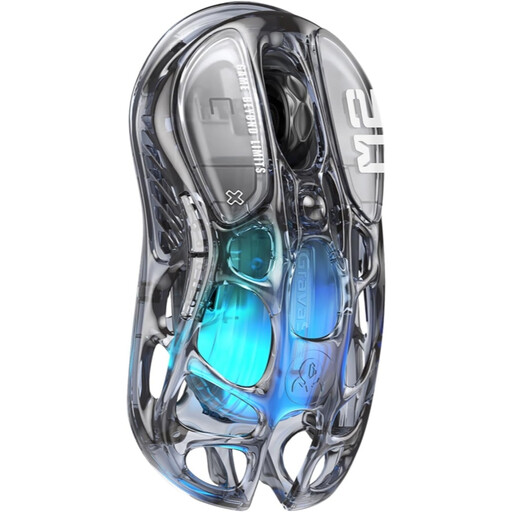
Why This Fits Their Persona: A practical entry into the Mercury design for UK PC and Mac users who want wireless flexibility, RGB lighting and a moderate 79g weight without requiring an 8K setup.
Its listed 1,000Hz polling rate is clearly stated, avoiding the assumption that every Mercury mouse includes an 8K receiver.
PAW3395 sensor, tri-mode connectivity, five programmable buttons and five listed RGB modes.
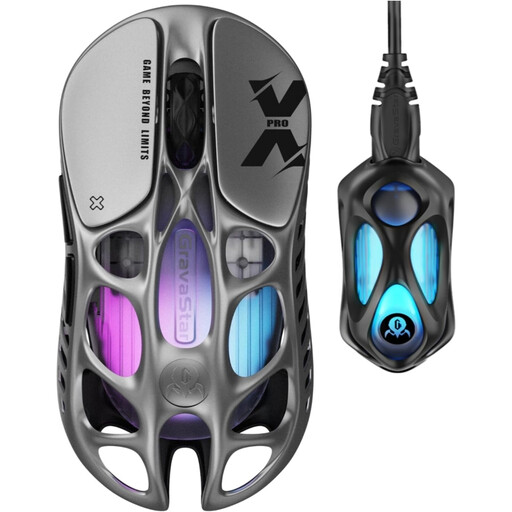
Why This Fits Their Persona: Suitable for competitive FPS players, streamers and tech-focused buyers who specifically want a very light magnesium alloy design and an included 8K dongle.
The listing specifies both the 8K polling rate and the included 8K wireless dongle, reducing the risk of buying an additional receiver.
49g weight, PAW3950 sensor rated to 32,000 DPI, up to 110 hours of listed battery life and tri-mode connectivity.
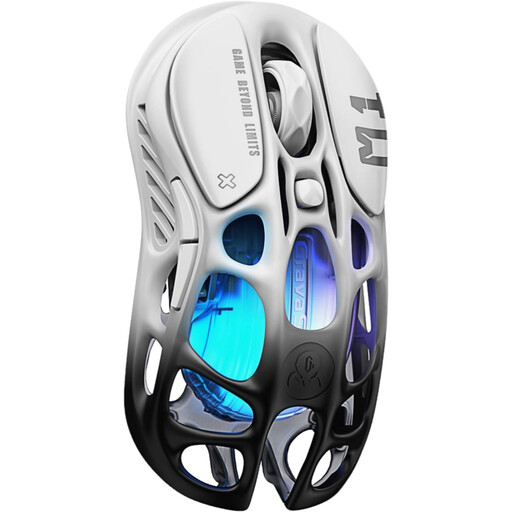
Why This Fits Their Persona: A balanced choice for players who alternate between gaming, work and multiple devices, and who want higher polling than the M2 without moving to the X Pro’s 49g format.
The product information separates the standard receiver from the separately sold 4K receiver, making the upgrade cost easier to account for.
88g magnesium alloy frame, PAW3395 sensor, five programmable buttons and wired, Bluetooth or 2.4GHz operation.
We have compiled a complete, real-time list of products that fully satisfy these strict selection criteria and UK safety regulations.
Not necessarily. It may be useful with a high-refresh-rate monitor and a capable gaming PC, but it can use more system resources. A reliable 1,000Hz or 4,000Hz connection may better match your equipment and budget.
The listing gives a battery life of up to 110 hours, but this varies with polling rate, RGB lighting, connection type and usage. Keeping lighting modest and charging before a long session can help maintain uninterrupted use.
The listed Mercury models specify compatibility with Windows/OS and offer Bluetooth, wired and 2.4GHz modes. Check the product page and software requirements before purchase, as advanced button, DPI and RGB customisation may depend on operating-system support.