
24/7 Customer Support

Free returns

Same-day & Next-day Delivery

Quality Guaranteed

Unlock Your Welcome Offers: FREE Delivery | Up to 80% OFF | Free 30-day JoyPlus trial
Download the APP
A mechanical gaming keyboard can improve comfort, control and desk organisation, but choosing one involves more than comparing RGB effects and advertised response times. The wrong layout may leave you reaching for missing keys, while an unsuitable switch type can make long sessions tiring or disturb others in a shared home.
This guide explains the practical specifications to check before buying mechanical gaming keyboards in the UK, followed by recommendations matched to different users and budgets.
An 8000Hz polling rate sounds impressive, but it is only one part of keyboard responsiveness. Your PC, game settings and monitor refresh rate also affect how noticeable the difference is. A high polling rate may be useful for competitive gaming, but it should not outweigh build quality, switch behaviour or software reliability.
Look instead for a combination of adjustable actuation, stable USB connectivity and anti-ghosting. Features such as Rapid Trigger can be particularly relevant to FPS players because they allow a key to reset as soon as it moves upwards, rather than waiting for a full release.
A 60% gaming keyboard usually removes the dedicated function row, arrow keys and navigation cluster. This creates more room for a mouse, but secondary functions may require Fn shortcuts.
A 65% gaming keyboard normally retains arrow keys, while a 75% mechanical keyboard usually adds a function row in a compressed arrangement. For office work, coding or spreadsheets, a 75% or 96% model may be easier to live with than a smaller board.
A wireless mechanical keyboard can reduce cable clutter, but battery capacity, charging time and connection modes vary. Bluetooth is suitable for general typing and tablets, while 2.4GHz wireless is generally more appropriate for gaming. A tri-mode wireless keyboard offering Bluetooth, 2.4GHz and USB-C wired operation gives greater flexibility, but check whether the receiver is included and where it is stored when travelling.
Traditional mechanical switches use physical contacts and are commonly available in linear, tactile and clicky versions. Linear switches provide a smooth press, tactile switches offer a noticeable bump, and clicky switches produce a distinct sound that may not suit an open-plan office.
A Hall Effect keyboard or magnetic switch keyboard measures key movement magnetically. This enables adjustable actuation and features such as Rapid Trigger. Some models allow actuation changes from around 0.1mm to 4.0mm, letting you prioritise quick inputs or reduce accidental presses.
Optical-mechanical switches use light-based triggering rather than conventional electrical contacts. They can also support adjustable actuation, although the precise implementation differs between products. Check the manufacturer’s software requirements and whether settings are saved to onboard memory.
UK buyers should confirm whether the keyboard uses a UK ISO layout or a US QWERTY arrangement. A UK layout normally includes a taller Enter key and different symbol positions. A US layout can still work with UK operating-system settings, but printed keycaps may not match the symbols produced.
Consider your desk and daily tasks:
For a wired esports keyboard, check for a detachable USB-C cable, N-key rollover and anti-ghosting. Wireless users should compare battery capacity, connection switching and whether lighting reduces battery life.
A hot-swappable keyboard allows compatible switches to be replaced without soldering. Confirm whether the sockets accept 3-pin, 5-pin or specific magnetic switches. Double-shot PBT keycaps generally resist surface wear better than standard ABS keycaps, while aluminium top plates can provide additional rigidity.
RGB lighting is mainly an aesthetic feature. An RGB mechanical keyboard may offer per-key effects, brightness control and software profiles, but lighting should not be confused with performance.
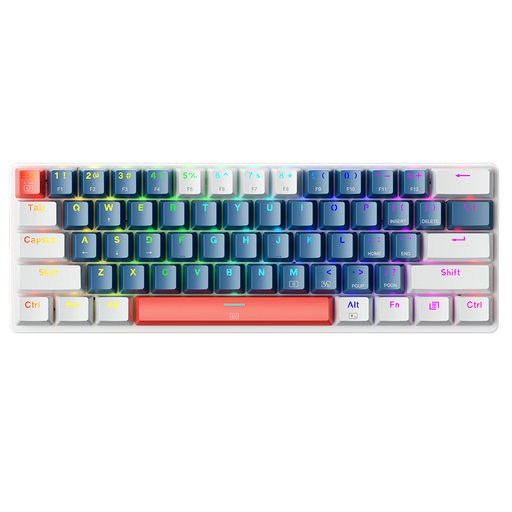
Why This Fits Their Persona: A straightforward wired 60% option for new PC gamers who want a compact desk setup without paying for wireless hardware.
The wired connection avoids battery maintenance, while the 60% layout is clearly defined before purchase.
Brown switches provide a tactile typing feel, and RGB lighting adds configurable desktop illumination.

Why This Fits Their Persona: Its UK ISO layout suits local buyers who want compact dimensions, configurable magnetic switches and a more substantial wired build.
The 65% format keeps arrow keys, while the UK ISO specification reduces the risk of receiving unfamiliar key placement.
ROG HFX magnetic switches offer 0.1–4.0mm adjustable actuation, Rapid Trigger and dual USB-C wired connectivity.

Why This Fits Their Persona: The 65% layout leaves room for wide mouse movements, making it suitable for players using low sensitivity in FPS titles.
Its key specifications identify the actual control features—magnetic switches, adjustable actuation and Rapid Trigger—rather than relying on lighting claims.
The board has linear Hall Effect switches, 0.2–4.0mm actuation adjustment, an 8000Hz polling rate and an aluminium top plate.

Why This Fits Their Persona: The 96% format keeps arrow and number keys for work while offering flexible connections for a PC, laptop or tablet.
Its tri-mode connection reduces reliance on one wireless standard, and the larger layout avoids the missing-key compromise of a 60% board.
It supports wired, Bluetooth 5.0 and 2.4GHz modes, with hot-swappable 3-pin and 5-pin switch support and an 8000mAh battery.
We have compiled a complete, real-time list of products that fully satisfy these strict selection criteria and UK safety regulations.
Yes, provided you choose an appropriate switch and layout. Linear or tactile switches are often quieter than clicky switches, while sound-dampening foam can reduce resonance. A 75%, 96% or full-size board may be more practical if you regularly use function keys or a number pad.
Rapid Trigger can reduce the movement required to reset a key, which may benefit repeated strafing or quick directional inputs. However, it does not replace practice, and the advantage depends on the game, settings and your ability to control sensitive actuation.
Lifespan depends on switch construction, keycap material, dust, moisture and usage. Some products specify a rated number of keystrokes, but this is a component rating rather than a guarantee of overall keyboard life. Keeping drinks away, disconnecting the board before cleaning and using a soft, dry cloth can help protect the switches and PCB.