What should you check first?
Start with the locations where a failed connection would disrupt work, then match a connection method and plan to the devices and tasks you use there.
| Priority | What to check | Your needs |
|---|
| Local coverage |
Use Ofcom’s checker for regular work postcodes and travel areas; compare providers’ indoor and outdoor 4G/5G predictions and likely quality. Test a prospective network where and when you normally work if reliability is critical. |
My calls and cloud work depend on a connection at the actual desk or stop, not just coverage elsewhere. Ofcom cautions that network demand can make experience differ from a prediction. |
| Connected devices |
Check Personal Hotspot permission, SIM format, eSIM eligibility and the device’s supported mobile bands. For a separate hotspot, check its Wi-Fi device limit and whether a wired port is needed. |
A laptop and tablet may need to share one connection, or I may want work Wi-Fi separate from my phone. An eSIM route works only with a compatible device and supported plan. |
| Data and plan terms |
Compare the stated allowance with video calls, cloud synchronisation and downloads. Read the exact tariff’s speed-management, fair-use, tethering, device-use and roaming conditions. |
Will my usual work still be practical after any high-speed allowance is used? An unlimited UK-data label does not, by itself, explain speeds or use abroad. |
| Repeat-location fallback |
Check mobile and fixed-broadband availability at the address before assessing fixed wireless or satellite. For satellite, examine equipment needs, availability and what happens after the plan’s high-speed allowance. |
At a place I return to regularly, I need a connection suited to the work task rather than a travel solution that only works intermittently. Starlink says its Roam 100GB plan continues at low speed after 100GB, which can limit video calls and downloads. |
Relevant brands and providers
These references help explain plan and hardware differences; they are not a list of products available in the Joybuy selection below.
EE
A UK mobile-plan provider to consider for phone tethering and SIM-based work connections.
- EE Business says tethering forms part of a business plan’s data allowance.
- EE says speeds on its unlimited SIM-only plans may be slowed at busy locations after more than 600GB of monthly use. Check the terms of the particular plan.
Three
A UK mobile-plan provider whose domestic unlimited-data and roaming conditions need to be considered separately.
- Three states that its unlimited UK data plans have no data caps or fair-use policy.
- Three’s Personal Hotspot rules differ in roaming destinations; domestic terms do not establish what you can use abroad or how well the network works at a particular address.
O2
A UK mobile-plan provider with eSIM options for eligible customers using supported plans and devices.
- O2 lists eSIM support for compatible smartphones, tablets and selected wearables.
- O2’s unlimited-data terms distinguish handset or SIM-only use from mobile-broadband tariffs and place conditions on the devices used.
TP-Link
A mobile-router brand relevant when several devices need a separate Wi-Fi network.
- TP-Link specifies 5G, Wi-Fi 6E, a Gigabit WAN/LAN port and up to 32 concurrent devices for its M8550 model.
- Those M8550 specifications do not establish mobile-network performance at your work location; check SIM compatibility and local service.
Starlink
A satellite option to assess for a repeat location where suitable terrestrial connections fall short.
- Starlink offers Roam plans intended for connectivity while travelling or working remotely.
- Starlink says Roam 100GB changes to unlimited low-speed data after its high-speed allowance; confirm service availability and equipment requirements for the intended location.
Joybuy hotspot and SIM options
These options cover a separate mobile hotspot and UK-data SIM plans for working between locations. Choose a usable network and check that the hardware and plan permit your intended devices and work activity.
 No image available
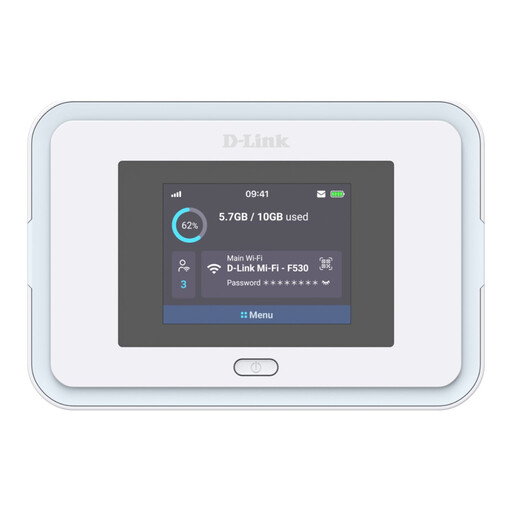
D-Link F530 5G NR AX3000 Wi-Fi 6 mobile hotspot
A separate hotspot is an option when several work devices need shared Wi-Fi without tethering to a phone. The listing specifies 5G NR, AX3000 Wi-Fi 6, a Nano-SIM slot, USB-C and a 5260 mAh battery. Confirm the device’s compatibility with your intended network and obtain a suitable SIM and data plan; these hardware specifications do not establish coverage at your work locations.
View on Joybuy
 No image available
CMLink UK SIM, 100GB UK data, 10GB roaming data
The listed preloaded one-month plan offers 100GB of UK data and 10GB for the EU and other named destinations. It may suit work across locations if its network covers them. Before using it in a phone or router, confirm the SIM format, permitted tethering or device use, roaming destinations and full speed-management terms.
View on Joybuy
 No image available
CMLink UK SIM, 40GB UK data, 6GB roaming data
The listed preloaded one-month plan offers 40GB of UK data and 6GB for the EU and other named destinations. Compare those allowances with your calls, downloads and travel plans. Check coverage where you work, SIM format, tethering or router permission, roaming destinations and speed-management terms.
View on Joybuy
 No image available
CMLink UK SIM, unlimited UK data, 20GB roaming data
This listed preloaded one-month plan advertises unlimited UK data and 20GB for the EU and other named destinations. Before relying on it for sustained work, check the full fair-use and speed-management terms, the permitted device and tethering use, the SIM format and coverage at your regular locations.
View on Joybuy
Common questions
How should I check coverage before choosing a UK data plan?
Use Ofcom’s Map Your Mobile checker for each regular work postcode and the areas where you travel. Compare indoor and outdoor 4G/5G predictions by provider, then test a prospective network where you normally work: Ofcom notes that actual experience can differ with local conditions and network demand.
Can phone tethering replace a dedicated hotspot?
Phone tethering can cover occasional use if the phone supports Personal Hotspot and the plan permits the intended sharing. A dedicated hotspot is worth considering when several devices need a separate Wi-Fi connection or you require a model-specific feature such as a wired port; either route still needs suitable mobile coverage and a compatible plan.
Does unlimited mobile data mean unrestricted work use?
No: check the exact plan’s speed-management, fair-use, device-use and roaming terms. EE says it may slow speeds at busy locations after more than 600GB in a month on its unlimited SIM-only plans; O2 applies device-use conditions; Three states that its unlimited UK plans have no data caps or fair-use policy, while its roaming hotspot rules differ.
When should I consider satellite instead of mobile data?
Consider satellite for a repeat location after checking whether available mobile, fixed-broadband or fixed-wireless services meet your work needs there. Check equipment and service availability as well as data behaviour: Starlink says Roam 100GB continues at low speed after 100GB, which may limit video calls and downloads.


