What to check before choosing
Check the network at your regular locations, then decide how the laptop will connect and whether the data allowance and charging arrangements fit a working day.
Phone tethering
Consider it when: One laptop needs occasional access and your phone plan permits tethering.
Trade-off: The connection uses the phone’s signal, data allowance and battery; EE Business says tethering is part of its applicable plan allowance.
Dedicated mobile hotspot
Consider it when: Several devices need to share mobile data or you want a connection separate from your phone.
Trade-off: A hotspot is another device to carry and charge, and its 4G or 5G connection still depends on local coverage.
Cellular-capable laptop
Consider it when: Your laptop has compatible cellular hardware and you prefer a direct SIM or eSIM connection.
Trade-off: Microsoft says the PC must support cellular connectivity; the SIM or eSIM and operator arrangement must also be compatible.
| Concern |
What to check |
Who this matters to |
| Coverage where you work |
Compare networks for regular postcodes, nearby stops and indoor use in Ofcom’s checker; test at important locations because its results are predictions. |
I need a connection in the buildings and along the routes I actually use, not just a promising coverage map. Around 36% of consumers would put dependable local coverage first. |
| Allowance and plan terms |
Check the exact UK data allowance, permitted device or tethering use, what happens at the limit and the commitment and renewal terms. |
If I work online for longer sessions, my plan needs to accommodate that use without an unsuitable commitment. For around 29% of consumers, allowance and plan terms would be the primary concern. |
| Device compatibility |
Confirm laptop cellular support before choosing a direct SIM or eSIM; for a hotspot, check the SIM arrangement and the connections your devices require. |
I want my laptop and any other devices to connect in the way my work requires, without assuming every SIM or router will fit. Around 21% of consumers would prioritise that device match. |
| Power and charging |
Plan how to charge the phone or hotspot; match any laptop power accessory to the laptop’s charging input, cable and required output. |
On a long journey without mains power, I need the connection and my phone to remain usable. Keeping devices powered would come first for around 14% of consumers. |
Hotspots and data SIMs on Joybuy
These products cover two ways to set up a separate mobile-data connection: portable D-Link hotspots and CMLink SIM plans. A SIM plan is not hotspot hardware; check coverage, the permitted device use and compatibility before pairing the two or using a SIM directly in a laptop.
 No image available
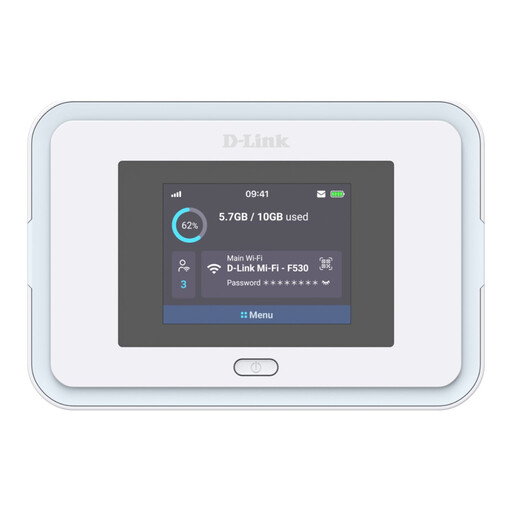
D-Link F530 5G NR AX3000 Wi-Fi 6 mobile hotspot
Consider this dedicated hotspot if a laptop and other Wi-Fi devices need a separate mobile connection. Its title specifies 5G NR, AX3000 and Wi-Fi 6; check coverage on your intended network, SIM compatibility and the exact network bands before buying.
View on Joybuy
 No image available
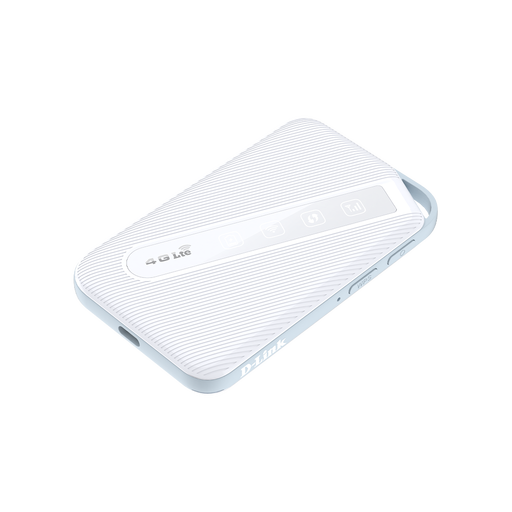
D-Link DWR-932W 4G LTE AX300 Wi-Fi 6 mobile hotspot
Consider this portable hotspot when a 4G connection suits your regular locations and several Wi-Fi devices need to share it. The title specifies 4G LTE, AX300 and Wi-Fi 6; confirm the network bands and SIM compatibility for the service you intend to use.
View on Joybuy
 No image available
CMLink UK SIM — unlimited UK data, 1-month plan preloaded
This SIM is relevant if you need a mobile-data plan for a compatible device. Its title also states 20GB for EU and other destinations; check the conditions attached to the unlimited UK data claim, renewal terms and whether use in your laptop or hotspot is permitted.
View on Joybuy
 No image available
CMLink UK SIM — 100GB UK data, 1-month plan preloaded
This stated UK allowance may be worth considering if it fits your expected laptop use and the SIM is permitted in your chosen device. The title also states 10GB for EU and other destinations; check what happens after the relevant allowance, along with compatibility and renewal terms.
View on Joybuy
No image available
CMLink UK SIM — 40GB UK data, 1-month plan preloaded
This stated allowance may suit a lighter pattern of mobile laptop use if the plan permits your intended device. The title also states 6GB for EU and other destinations; check device eligibility, treatment at the data limit and renewal terms.
View on Joybuy
Frequently asked questions
How do I check coverage before choosing a hotspot or SIM?
Use Ofcom’s Map Your Mobile checker for your regular work postcodes and inspect the areas around frequent stops and journeys. Compare networks and indoor versus outdoor predictions, then try the connection where dependable access matters: Ofcom cautions that predicted coverage can differ from experience on the ground.
When is phone tethering enough for a work laptop?
Phone tethering can be enough for occasional use by one laptop when your signal, permitted data allowance and charging arrangements meet the task. EE Business describes Wi-Fi, USB and Bluetooth tethering on supported devices and says its tethering uses the applicable plan allowance; confirm the terms of your own tariff.
When is a separate mobile hotspot worth carrying?
A dedicated hotspot is worth considering when several devices need one mobile connection or you want to keep your phone free. Vodafone describes a hotspot as a battery-powered device that shares Wi-Fi, while Three offers portable 4G and 5G MiFi; whichever device you choose still needs suitable network coverage, a compatible data arrangement and charging.
Can my laptop use a data SIM or eSIM without a hotspot?
Yes, if the laptop has compatible cellular hardware and the operator supports the intended SIM or eSIM arrangement. For a Windows PC, Microsoft advises checking for a Cellular page in Settings; without embedded cellular support, use a compatible external cellular device or connect through a phone or hotspot instead.
Is a mobile hotspot automatically safe for work?
No connection method replaces your organisation’s security requirements. The National Cyber Security Centre warns that public Wi-Fi or insecure networks can expose mobile-device traffic to attackers on the same network; use your employer-approved security configuration rather than assuming a portable or password-protected connection settles the question.


