For a shared office comparing broadband plans, start with a familiar keyboard layout and consider how typing noise affects nearby colleagues. A wired USB keyboard avoids pairing and charging at a fixed desk; wireless switching is more useful when someone regularly changes computers. For sustained typing, assess the whole workstation rather than relying on an ergonomic keyboard alone.
Who needs which keyboard?
People working close to colleagues
If you enter plan details and notes beside other people, key noise may matter as much as layout. Look for an explicitly quiet keyboard, then consider whether its key feel suits you; Logitech describes its MK470 as a quiet, low-profile option.
Fixed-desk administrators
If several people use the same workstation to enter figures, a wired connection avoids pairing and battery tasks. The Dell KB216 and HP 320K are examples with a number pad; check the connector and keyboard layout for the desk in question.
People typing for extended periods
If comparing providers means sustained note-taking and spreadsheet work, allow space to position the keyboard comfortably. The Health and Safety Executive advises assessing the workstation for workers who use display screen equipment regularly, rather than treating keyboard shape as the whole solution.
What matters when choosing?
Settle the shared room’s noise and layout needs first, then choose a connection that fits how the desk is used. Check comfort in the context of the desk, chair and screen.
| Concern |
What to check |
Who this matters to |
| Typing noise |
Look for an explicit quiet-key description, and check the sound if possible; a key type alone does not establish how quiet a keyboard will be. |
When colleagues sit close together, I want to enter plan notes without distracting them. Around 40% of consumers put quieter typing first. |
| Fixed-desk setup |
Confirm the available USB connection, cable placement, UK key layout and whether a number pad is needed. |
At a desk used by several people, I want the next person to start entering figures without pairing a device or managing its battery. Roughly 30% of consumers prioritise straightforward setup. |
| Extended-use comfort |
Check keyboard positioning and space for the hands and arms alongside the chair, desk and screen; try the shape where possible. |
If I spend long periods comparing providers and updating notes, I need a working position that suits me. Around 30% of consumers put sustained-use comfort first. |
Mistakes to avoid
-
Assuming tactile keys will suit a quiet room
Logitech notes that many mechanical keyboards make audible clicks that can distract people in shared spaces. Key feel alone does not tell you how a particular model will sound.
If you prefer mechanical keys, check the exact switch specification and, where possible, listen to the keyboard before choosing it for close seating.
-
Assuming a model number guarantees a UK layout
The Dell KB216 is listed in an English-UK QWERTY version, while another KB216 listing identifies a US International QWERTY version. The base model name is not enough to distinguish them.
Check the full variant name and key layout on the product listing before ordering for UK staff.
An unsuitable layout can also mean time spent arranging a replacement.
-
Expecting an ergonomic keyboard to fix the whole workstation
The Health and Safety Executive’s display screen equipment guidance addresses workstation setup as well as equipment choice. A keyboard’s shape cannot settle whether the desk, chair and screen are suitably positioned.
Assess the complete setup, especially when someone uses the desk for sustained periods or regularly moves between desks.
Brands relevant to these choices
Logitech
Its office range includes compact wireless combinations, multi-device keyboards and shaped keyboards for people considering different desk arrangements.
- Logitech describes the MK470 keyboard-and-mouse combination as quiet and low-profile; MX Keys for Business supports switching among up to three computers.
- For these wireless models, check the required receiver or Bluetooth connection and how batteries or charging will be managed. A shaped keyboard still needs to fit its user and workstation.
Dell
The English-UK QWERTY KB216 illustrates a wired option for a desk that stays connected to one workstation.
- Dell specifies USB Type-A, adjustable tilt, a number pad, quiet keys and spill resistance for this KB216 variant.
- The cable limits placement flexibility, and Dell lists the palm rest separately.
HP
The wired 320K is an office-keyboard example for shoppers considering a number pad and low-profile keys.
- HP specifies a three-zone layout, a 6° adjustable slope and a USB connection for the 320K.
- HP’s cleaning description refers to select disinfecting wipes. Follow the instructions for the exact product rather than assuming any wipe is suitable.
Joybuy keyboard options
These options cover wired keyboard-and-mouse sets for a shared desk and a wireless split-layout keyboard for someone considering a different typing position. Check each variant’s layout and connection against the workstation before choosing.
 No image available
MSI GK-701 USB Keyboard and Mouse Set, UK Layout, CoPilot Key
Consider this set for a desk where a wired keyboard and mouse can stay connected. Its listed variant has a UK layout and USB connection; check the key sound and working angle if those are important in your shared room.
View on Joybuy
 No image available
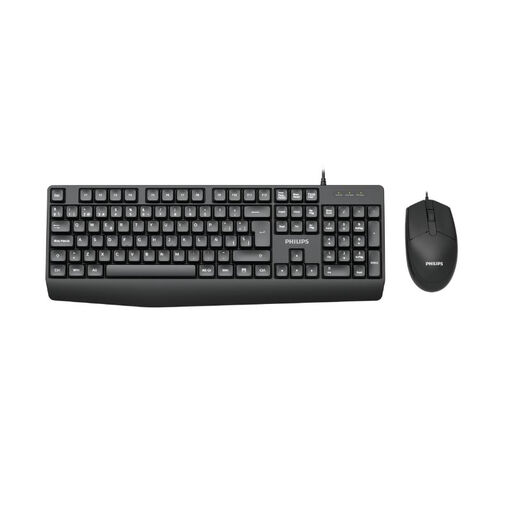
Philips 2000 Series SPT6237B/05 Wired Keyboard and Mouse, UK English
This wired set suits a workstation where staff want a UK English keyboard and mouse together. If entering figures on a dedicated number pad is essential, confirm the keyboard layout before buying.
View on Joybuy
 No image available
HP 960 Wireless Split-Layout Keyboard with Padded Wrist Rest
Consider its split layout if a regular user wants to assess a different typing position for extended work. Confirm that the wireless connection and exact key layout suit the workstation, and assess the wrist rest as part of the complete desk setup.
View on Joybuy
Shared-office keyboard questions
Is an ergonomic keyboard enough for a shared-office workstation?
No: keyboard shape is only one part of workstation setup. The Health and Safety Executive advises assessing display screen equipment workstations, including how the keyboard, screen, desk and chair are used.
When should regular keyboard users consider DSE guidance?
The Health and Safety Executive says the UK Display Screen Equipment Regulations apply to workers who use display screen equipment daily for continuous periods of an hour or more. Its guidance also addresses hot-desking, so people who change desks regularly should check the setup they use.
Should a shared office avoid mechanical keyboards?
Not automatically, but do not assume a mechanical keyboard will be quiet enough for close seating. Logitech notes that many mechanical keyboards produce distracting clicks in quiet spaces; check the exact switches and sound of the model you are considering.
Can any disinfectant wipe be used on a shared keyboard?
No product-specific cleaning statement covers every wipe. HP describes its 320K as suitable for cleaning with select disinfecting wipes; follow the instructions for your exact keyboard and cleaning product.


