
24/7 Customer Support

Free returns

Same-day & Next-day Delivery

Quality Guaranteed

Unlock Your Welcome Offers: FREE Delivery | Up to 80% OFF | Free 30-day JoyPlus trial
Download the APP
For mechanical keyboard enthusiasts, gamers, programmers and content creators, the Siukie CTRL100 mechanical keyboard combines a compact layout with features usually associated with larger custom boards. However, an impressive specification list does not automatically mean every feature will suit your desk, workflow or typing preferences.
Before buying, it is worth checking three common pitfalls: layout compatibility, wireless limitations and complex mechanical features. The CTRL100 is available in a US QWERTY layout, uses a motorised lift mechanism and supports several connection modes, so understanding the practical details matters more than relying on promotional wording.
By Joybuy Product Recommendation Officer
A 96% mechanical keyboard retains many practical keys while using a more compact arrangement than a conventional full-size board. This can save desk space, but the key positioning and spacing may differ from what UK users expect.
The Siukie CTRL100 is specified as US QWERTY, not UK ISO. Buyers who regularly use £, €, quotation-mark or other UK-specific key combinations should check whether the US layout suits their operating system and typing habits. Windows allows you to switch keyboard layouts, but the printed legends and physical key arrangement remain important.
A tri-mode wireless keyboard typically offers Bluetooth, 2.4GHz wireless and USB-C wired connectivity. These modes serve different purposes:
Wireless performance depends on the surrounding environment, receiver placement, operating system and device compatibility. Confirm that your computer has a suitable USB port for the 2.4GHz receiver, and remember that the keyboard contains a rechargeable battery requiring regular charging.
The CTRL100 includes an innovative motorised lift mechanism and a customisable IPS screen. These are distinctive additions, but they also introduce extra moving and electronic components compared with a conventional keyboard.
The lift area should remain clear of fingers, hair, cables and small objects during adjustment. The product safety information warns that the mechanism may pinch or crush. Keep liquids away from the keyboard, do not disassemble the battery and follow available software or firmware update instructions.
The CTRL100 uses a CNC aluminium mechanical keyboard design. Aluminium can provide a solid, substantial feel, but the material alone does not determine typing comfort, sound or long-term satisfaction. Buyers should also consider desk weight, portability and whether they prefer a more rigid or softer typing experience.
The keyboard is fitted with HMX Cream Taro HIFI switches, described as linear and pre-lubed. Linear switches provide a smooth keypress without a tactile bump, which may appeal to fast typists and gamers who prefer consistent travel.
Pre-lubing can reduce friction when new, although key feel may change over time depending on usage, dust and maintenance. If you prefer a noticeable tactile response or audible click, linear switches may not match your preference.
A gasket mount keyboard uses cushioning elements between parts of the plate and case. In practical terms, this design is intended to provide a less rigid typing feel than a fully fixed mounting system, although the result depends on the complete internal construction and key switches.
The customisable IPS screen adds a visual display area for personal content or information. Check the supported software before purchase if screen customisation is a priority, particularly if you want to use custom images, animations or system data.
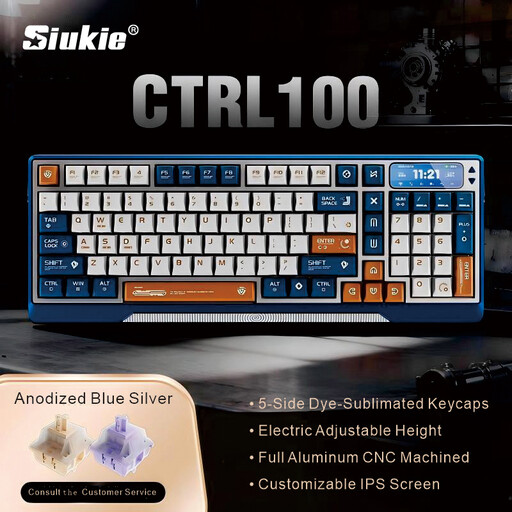
Why This Fits Their Persona: A practical starting point for shoppers who want a compact enthusiast-style board without giving up wireless, wired and display features. The Klein Blue finish also provides a clear alternative to conventional black or grey desk hardware.
Its US QWERTY layout and three connection options are stated clearly, helping buyers check compatibility before ordering rather than assuming a UK layout or universal wireless support.
96% layout, HMX Cream Taro HIFI linear pre-lubed switches, gasket mount and Bluetooth, 2.4GHz wireless and USB-C connectivity.

Why This Fits Their Persona: Suits users building a coordinated home office, gaming desk or content-creation setup who value aluminium construction, a distinctive finish and integrated customisation features.
The product specification identifies the CNC aluminium case, gasket mount and motorised lift separately, making it easier to distinguish construction features from screen-based styling.
CNC aluminium body, customisable IPS screen, motorised lift mechanism and linear HMX switches in a compact 96% format.
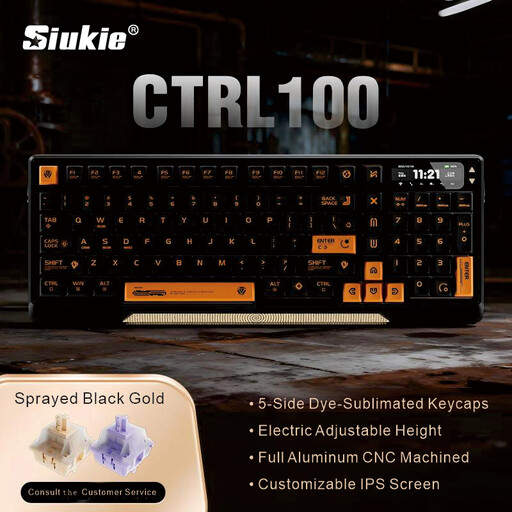
Why This Fits Their Persona: A suitable format for users switching between work, gaming and creative applications who need both desktop wireless convenience and a USB-C wired fallback.
The combination of Bluetooth, 2.4GHz wireless and USB-C wired use reduces reliance on one connection method, while the safety guidance highlights care around the motor and rechargeable battery.
Tri-mode connectivity, compact 96% layout, gasket mounting and an IPS screen designed for customisable display content.
We have compiled a complete, real-time list of products that fully satisfy these strict selection criteria and UK safety regulations.
Before placing an order, review the following points:
It can be used in the UK, but its specified physical layout is US QWERTY. Check the differences between US and UK keyboard layouts before buying, particularly if you rely on printed key legends or UK-specific punctuation.
Yes. It supports USB-C wired connectivity as well as Bluetooth and 2.4GHz wireless modes. Wired use can be practical during charging, firmware updates or when you want to avoid wireless pairing.
The product information does not state a guaranteed service life. Actual durability depends on typing frequency, switch wear, dust, liquid exposure, battery care and handling of the motorised lift. Keeping the board dry, following the manufacturer’s software guidance and avoiding obstruction around moving parts can help support reliable use.