Choose for the console or PC running the game, not for the TV or monitor it appears on: the Xbox Wireless Controller covers Xbox and Windows PC, DualSense suits PS5 and compatible PC use, and a configurable Windows controller calls for a check of its exact platform list. For EA’s skate., the PC requirements specify controller input, and its trick controls use both analogue sticks. Prioritise platform fit and a stick layout you can use comfortably before paying attention to features your game may not support.
Who this is for
Platform-matched TV players
If you play on a console or a PC connected to a TV, start with the device running the game. Electronic Arts lists its current skate. release for PC, PS4, PS5, Xbox One and Xbox Series X|S; the controller still needs to match your particular platform.
Players learning stick-led tricks
If you are learning or refining tricks in EA’s skate., both sticks deserve attention. Electronic Arts assigns steering to the left stick and flip tricks and board adjustments to the right, so consider whether the stick placement feels comfortable to you.
Windows sofa players who want adjustable controls
If your Windows PC drives a large display, you may value wireless use, a charging dock or adjustable settings. Check Windows compatibility first, then decide whether you would use those conveniences; 8BitDo lists its Ultimate 2 Bluetooth Controller for Windows and Switch.
What to check before buying
Match the controller to the gaming platform first, then consider stick placement and the practicalities of playing away from the screen. For EA’s skate. on PC, also account for its stated controller and online-connection requirements.
Xbox Wireless Controller
Consider it: For an Xbox console or Windows PC, both of which Microsoft lists as compatible.
Check: For PC play, confirm how your particular computer will connect before choosing wireless use.
DualSense Wireless Controller
Consider it: For PS5, or a compatible Windows PC if you prefer the PlayStation layout.
Bear in mind: PlayStation says PC haptic feedback requires USB and game support; adaptive triggers also depend on the game.
8BitDo Ultimate 2 Bluetooth Controller
Consider it: For a Windows setup where profiles, adjustable settings and a charging dock matter to you.
Check: 8BitDo lists this model for Windows and Switch; do not assume Xbox or PlayStation console compatibility.
| Concern |
Buying check |
Who this matters to |
| Platform and connection |
Match the controller’s official platform list to the console or PC running the game. For PC, check whether your intended cable, Bluetooth connection or adapter will work with your setup. |
If my game runs on a console or PC connected to the TV, I need the controller to work with that device before its other features matter. Around 46% of consumers put platform and connection fit first. |
| Thumbstick control |
Consider the placement and reach of both sticks. In EA’s skate., the left stick steers while the right handles flip tricks and board adjustments. |
When I am learning stick-led tricks, I want both sticks to feel manageable through repeated inputs. Comfortable trick control is the primary concern for around 36% of consumers. |
| Wireless convenience |
Check the connection method, power arrangements and whether a cable or receiver needed for your chosen mode is included. |
Playing away from the screen makes pairing and keeping the controller ready to use especially important to me. Around 18% of consumers prioritise that convenience. |
Buying pitfalls
-
Assuming Bluetooth means every platform will work
A wireless connection method does not establish console compatibility. Microsoft lists the Xbox Wireless Controller for Xbox and Windows PC, PlayStation supports DualSense on PS5 and compatible PCs, and 8BitDo lists its Ultimate 2 Bluetooth Controller for Windows and Switch.
Compare the exact model’s platform list with the device running your game before considering its colour or extra controls.
-
Checking the controller but not the PC game
Electronic Arts specifies controller input and an online connection for the current PC version of skate. Another skateboarding game may have different input requirements.
Read the requirements for the particular game as well as the controller’s PC compatibility information.
-
Assuming DualSense features work in every PC game
According to PlayStation, haptic feedback on PC requires a USB connection and game support; adaptive triggers also need a supported game.
Check support in the skateboarding title you intend to play before choosing DualSense for those effects.
-
Treating a returns policy as a compatibility check
A change-of-mind cancellation and a remedy for faulty goods are different matters. GOV.UK describes a cancellation period for qualifying distance sales, while the Consumer Rights Act 2015 sets statutory standards for goods.
Check platform fit before ordering, keep your order details and read the seller’s return terms without treating them as a replacement for statutory rights.
Brands to consider for this setup
Xbox
A first-party route for Xbox players and Windows PC players using a large screen.
- Microsoft lists the standard Xbox Wireless Controller for Xbox consoles and Windows PC, with Xbox Wireless and Bluetooth connectivity.
- If interchangeable components matter to you, compare the exact model’s controls rather than assuming the standard controller includes them.
PlayStation
A first-party route for PS5, with DualSense connection options for compatible Windows PCs.
- PlayStation lists USB-C and Bluetooth connection options for DualSense on compatible devices.
- On PC, haptic feedback needs USB and game support; adaptive triggers are available only in supported games.
8BitDo
A configurable third-party route worth considering for a Windows large-screen setup.
- 8BitDo lists a charging dock, profiles and adjustable controls for its Ultimate 2 Bluetooth Controller.
- The listed compatibility for that model is Windows and Switch; its features do not establish Xbox or PlayStation console support.
Joybuy controller choices
These controllers cover several ways to play on a large screen: an Xbox or Windows PC route, PS5 controllers, a PC-oriented option and a model labelled for PS4 and PC. Choose by the device running your game, then check the connection and controls relevant to your setup.
 No image available
Xbox Wireless Controller – Robot White
Consider this for Xbox or Windows PC play. Microsoft lists the standard controller for both; for a PC connected to a large screen, confirm your intended connection method before ordering.
View on Joybuy
 No image available
PlayStation DualSense Wireless Controller – Starlight Blue, V3
A PS5 choice to consider if you prefer the PlayStation layout; DualSense can also connect to compatible Windows PCs. For PC play, check your game’s support before relying on haptic feedback or adaptive triggers.
View on Joybuy
 No image available
Sony DualSense Edge PS5 Wireless Controller – White
For PS5 players considering the Edge model, decide which control adjustments you would use rather than assuming they will change play in a particular skateboarding game. Confirm the connection and game support you need if you plan to use it with a PC.
View on Joybuy
 No image available
Machenike G3 V2 Tri-mode Controller – White
For a Windows PC connected to a large display, check which connection mode you intend to use and whether the accessories it needs are included. If you plan to use 2.4 GHz wireless, confirm the receiver arrangement; also check recognition in your particular game.
View on Joybuy
 No image available
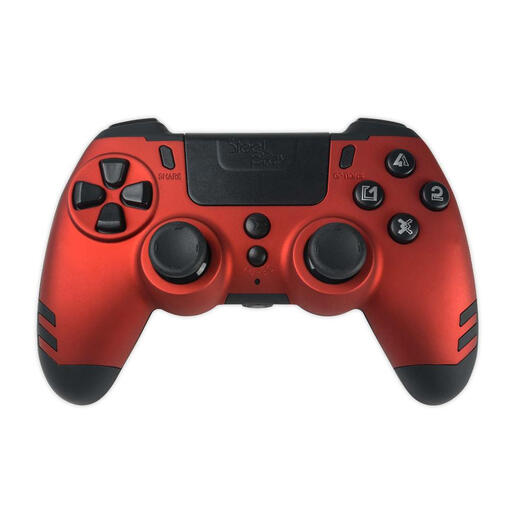
Lexip SteelPlay Slim Pack Wireless Controller – Ruby Red, PS4 and PC
Consider this PS4-and-PC-labelled model for a matching large-screen setup. For PC play, confirm that your particular skateboarding game recognises it; do not assume compatibility with other consoles.
View on Joybuy
Frequently asked questions
Do I need a controller to play EA’s skate. on PC?
Yes. Electronic Arts lists controller input as required for the current PC version of skate. It also requires an online connection, so a controller alone will not make an offline setup suitable.
Will DualSense haptics and adaptive triggers work in a PC skateboarding game?
Only if the particular game supports them, and PlayStation says PC haptic feedback also requires a USB connection. Check the game’s feature support before choosing DualSense for those effects.
Can I return an online controller purchase if I change my mind?
For qualifying UK distance sales, GOV.UK says you can tell the seller you want to cancel within 14 days of receiving the goods. Change-of-mind cancellation is separate from your statutory remedies if a controller is faulty or misdescribed; check the applicable return arrangements before sending it back.
What should I do with an old wireless controller?
Use an appropriate local electronics collection or retailer take-back route rather than putting it in ordinary household waste. GOV.UK explains that battery-powered products can fall within electrical and electronic equipment rules.


