
24/7 Customer Support

Free returns

Same-day & Next-day Delivery

Quality Guaranteed

Unlock Your Welcome Offers: FREE Delivery | Up to 80% OFF | Free 30-day JoyPlus trial
Download the APP
Modern laptops from brands like Apple, Dell and Microsoft are thinner and more powerful than ever. However, this sleek design often comes at the cost of connectivity, leaving you with only one or two USB-C ports. If you're a professional, student, or anyone who works on the go, you've likely faced the frustration of not being able to connect a monitor, a wired mouse and your power cable all at once.
Juggling a bag full of separate dongles is a clumsy and inefficient solution. You need a single, reliable device to bridge the gap between your laptop and the peripherals you depend on. This guide is designed to help you understand the key features to look for in a USB-C hub and to highlight some excellent options available today, so you can find the right tool to enhance your productivity.
Before you buy, it's important to consider how you'll be using your hub. A device that's perfect for a permanent home office desk might not be suitable for a frequent traveller. Here are a few key factors to keep in mind.
The primary function of a USB-C multiport adapter is to give you back the ports your laptop is missing. Take a moment to think about the devices you connect most often.
Consider where you'll be using your hub. If you're constantly moving between your home, the office and client sites, a compact and lightweight USB-C travel adapter is ideal. Look for models with integrated cable management and durable materials like aluminium that can withstand the rigours of travel. For a more permanent setup, a larger docking station for laptop might offer more ports and a more robust design, even if it's less portable.
We've looked at the market to find versatile and reliable options that cater to different needs. Here are our recommendations.
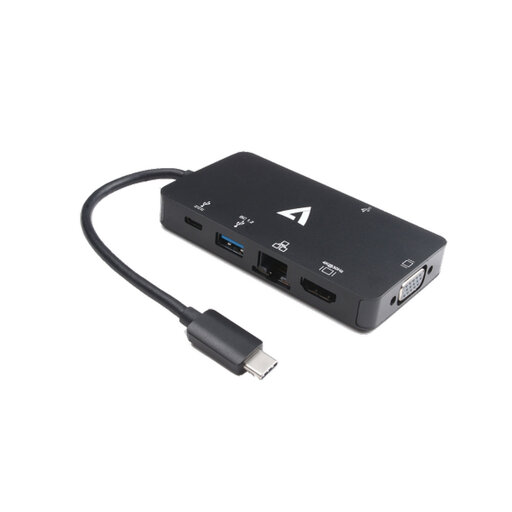
Why It Stands Out: This V7 adapter is a true workhorse, built for professionals who need maximum compatibility. Its standout feature is the inclusion of both HDMI and VGA video outputs, ensuring you can connect to virtually any display, from a modern 4K screen to an older projector in a university hall.
Pros:
Who is it for? This is an excellent choice for business travellers, educators and mobile professionals who need a single, reliable adapter that can handle any presentation environment.
View the V7 USB-C Adapter on Joybuy

Why It Stands Out: The Baseus Metal Gleam II is designed for power users and creative professionals. Its dual HDMI ports, one of which supports an impressive 4K@120Hz refresh rate, make it a fantastic option for complex multi-monitor setups, video editing and even gaming.
Pros:
Who is it for? This hub is geared towards video editors, designers, developers and anyone who relies on a high-performance, dual-display workstation.
View the Baseus 10-in-1 Hub on Joybuy
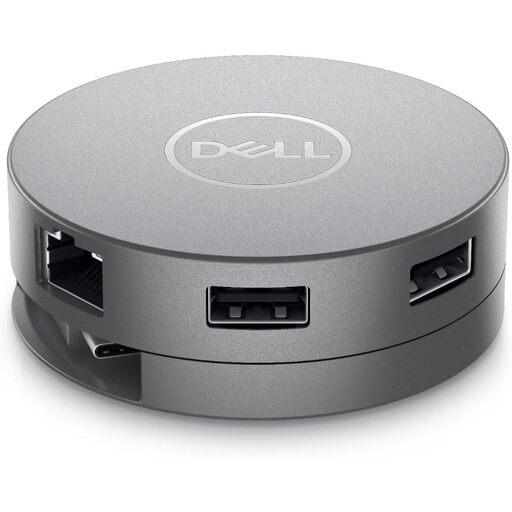
Why It Stands Out: The Dell DA310 prioritises portability without sacrificing essential functions. Its unique, compact circular design features a patented cable management system that lets you neatly tuck the cable away, making it incredibly easy to slip into a pocket or laptop bag.
Pros:
Who is it for? This is the perfect USB-C travel adapter for the minimalist professional who is always on the move and needs a reliable, pocket-sized solution for connectivity.
View the DELL Pro Travel Adapter on Joybuy
While these three hubs cover a wide range of uses, your specific needs might call for a different combination of ports or features. From simple, single-port adapters to comprehensive desktop docking stations, there is a solution for every setup.
Explore our full range of USB Type-C Adapters to find the perfect match for your devices.
1. Do all USB-C ports support video output? No, this is a common point of confusion. For a USB-C port to output video to a monitor via a hub, it must support DisplayPort Alternate Mode (DP Alt Mode). Most modern high-end laptops (like MacBook Pro, Dell XPS, Surface Pro) have this feature, but it's always wise to check your device's specifications before purchasing a hub for video use.
2. Will a USB-C hub slow down my internet or peripherals? A well-made hub should not cause noticeable slowdowns. Models with good internal shielding (often listed as EMI/RF shielding) prevent interference between the ports, Wi-Fi and Bluetooth signals. For performance, check the specifications: a Gigabit Ethernet port offers up to 1000Mbps and USB 3.2 ports offer data transfer speeds of 5Gbps or 10Gbps, which is more than enough for most peripherals.
3. Can I use a USB-C hub with my tablet or phone? Often, yes. Many modern tablets, such as the iPad Pro and Samsung Galaxy Tab series, support video output and peripherals via USB-C. This can effectively turn your tablet into a portable workstation. However, functionality can vary, so it is important to confirm your specific phone or tablet model's capabilities.