
24/7 Customer Support

Free returns

Same-day & Next-day Delivery

Quality Guaranteed

Unlock Your Welcome Offers: FREE Delivery | Up to 80% OFF | Free 30-day JoyPlus trial
Download the APP
Modern laptops, from the MacBook Pro to the Dell XPS, are celebrated for their sleek, minimalist design. However, this often comes at the cost of connectivity, leaving you with just one or two USB-C ports. If you find yourself juggling a collection of adapters—one for your monitor, another for a USB drive and a third for a stable internet connection—you know the frustration. The goal is to simplify this "dongle life" with a single, effective solution.
This guide is designed to help you navigate the options and find a USB-C hub that consolidates your connections. As a Joybuy Product Recommendation Officer, my role is to provide practical advice to help you choose the right tool for your specific needs, whether you're working from home, travelling for business or setting up a creative workstation.
Before selecting a device, it's helpful to consider what you'll be connecting. A little forethought can ensure you get a hub that serves you well for years to come.
Not all hubs are created equal. The ideal USB-C multiport adapter for you depends entirely on your workflow.
USB C hub with HDMI. For high-resolution work, ensure it supports 4K. For professionals who present in various settings, a model with a USB C to VGA adapter function can be invaluable for connecting to older projectors.USB C hub with Ethernet provides a stable, wired connection, which is crucial for uninterrupted video calls and large file downloads.USB C hub with Power Delivery (PD). This allows you to charge your laptop through the hub itself, using just one of your laptop's precious USB-C ports for both power and data. Check the wattage—a 100W PD port is recommended for power-hungry devices like a MacBook Pro hub.The terms are often used interchangeably, but there's a general distinction. A USB-C hub is typically compact, bus-powered (drawing power from the laptop) and designed for portability. A USB-C docking station is often larger, may have its own external power supply and is built for a permanent desk setup with extensive connectivity needs. For most hybrid professionals and travellers, a versatile hub strikes the perfect balance.
Here are a few recommendations that cater to different professional requirements, from daily commuting to complex multi-monitor setups.
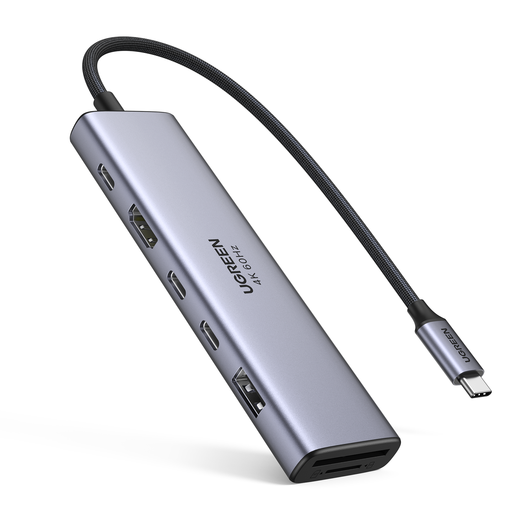
Why It Stands Out: This UGREEN model offers a fantastic balance of essential features and a compact form factor. It focuses on speed and efficiency, with upgraded USB-A 3.2 and USB-C 3.2 data ports that facilitate faster file transfers compared to older USB 3.0 standards.
Pros:
Who is it for? The hybrid professional or student who needs a reliable, everyday carry for connecting a monitor, charging their laptop and transferring files without delay.
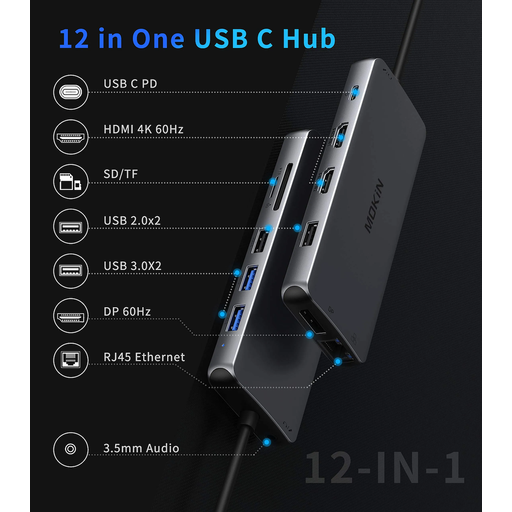
Why It Stands Out: This is a connectivity powerhouse. With support for up to three external displays (two HDMI and one DisplayPort), it transforms a laptop into a full-fledged workstation. It’s one of the most comprehensive options available for users with demanding multitasking needs.
Pros:
Who is it for? The power user, digital creative or remote worker who needs to manage a complex, multi-monitor desk setup from a single laptop port.
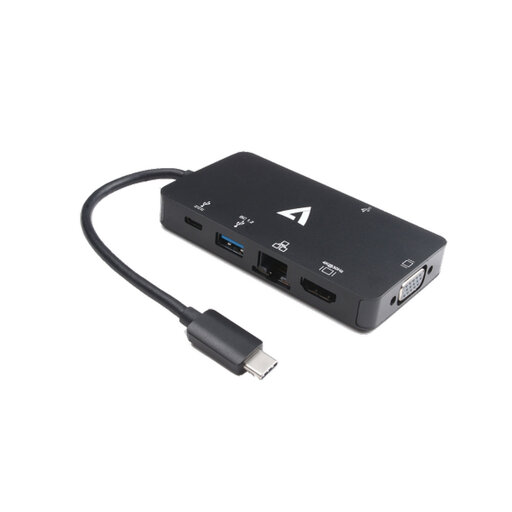
Why It Stands Out: This adapter from V7 is built for the travelling professional. Its standout feature is the inclusion of both a 4K HDMI port and a legacy VGA port. This dual-compatibility ensures you can connect to virtually any projector or monitor, whether in a modern boardroom or an older university lecture hall.
Pros:
Who is it for? The business traveller, consultant or academic who frequently presents in different environments and needs a reliable tool that connects to any display technology, new or old.
While a USB-C hub can streamline your digital workspace, we know that a tidy desk involves more than just cables. For other office essentials that help keep your setup organised, you can explore our wider collection.
Can a USB-C hub damage my laptop? A quality hub from a reputable manufacturer is designed with safety protocols to prevent damage. Look for features like over-current protection and use a charger that matches the Power Delivery specifications of both your hub and your laptop. It is always advisable to read the safety instructions provided with the product.
Do all USB-C ports support video output? No, this is a common point of confusion. For a USB-C hub to transmit video, the USB-C port on your laptop must support "DisplayPort Alternate Mode" (often shortened to DP Alt Mode) or be a Thunderbolt 3 or 4 port. Always check your laptop's specifications to confirm its capabilities before purchasing a hub for connecting monitors.
What is the difference between a USB-C hub and a docking station? Generally, a USB-C hub is a smaller, bus-powered device designed for portability and connecting a few key peripherals. A USB-C docking station is a larger, more stationary unit that often has its own power supply, supports more monitors and offers a greater number of ports, making it ideal for a permanent desktop workstation.