
24/7 Customer Support

Free returns

Same-day & Next-day Delivery

Quality Guaranteed

Unlock Your Welcome Offers: FREE Delivery | Up to 80% OFF | Free 30-day JoyPlus trial
Download the APP
By Joybuy Product Recommendation Officer
A USB flash drive remains a practical way to move photos, documents, videos and game files between devices. However, choosing one based only on capacity or a headline speed can lead to compatibility problems, slow transfers and avoidable data loss.
This guide explains the specifications that matter, the common buying traps to avoid and which type of drive may suit different UK users.
A listing may show an impressive read speed, but performance depends on the drive’s interface, the host device, file sizes and whether you are reading or writing data. A computer with an older USB port cannot deliver the full performance of a newer high-speed USB flash drive.
Check both read and write speeds, not just the larger number. Read speed affects opening or copying files from the drive, while write speed matters when backing up videos, photos or work folders.
A USB-C connector does not automatically guarantee compatibility. Your phone or tablet must support external storage, and some devices may require USB On-The-Go functionality or a file manager. iPhone USB-C storage can be convenient, but check the device operating system and any app requirements before buying.
A dual USB flash drive with USB-A and USB-C connectors is useful when you regularly move files between a traditional laptop and a modern phone. A USB-C-only model is more compact but less flexible for older computers.
Flash memory is portable and convenient, but it should not be your sole copy of irreplaceable photos, business documents or creative projects. Keep important files in at least one additional location, such as a computer, external drive or trusted cloud service.
Also check whether the casing protects the connector. Swivel, slide and flip-cover designs can reduce exposure to dust and scratches, but no USB flash drive should be treated as automatically waterproof or indestructible unless the listing clearly states a relevant rating.
Choose capacity according to the files you handle:
Usable space is lower than the stated capacity because storage manufacturers calculate gigabytes using decimal measurements and some space is reserved for formatting and system information.
USB 3.0, USB 3.1 and USB 3.2 Gen 1 products commonly offer backwards compatibility with older USB ports, but the connected port remains a performance limit. Some drives use USB 3.2 Gen 2×1 hardware and advertise speeds above 1,000MB/s. These figures are typically maximum sequential rates under suitable conditions, rather than a guarantee for every file transfer.
For occasional documents, a conventional USB 3.0 memory stick may be sufficient. For 4K footage, large game installations or repeated mobile backups, look for a high-speed USB flash drive with a clearly stated write speed and a suitable device interface.
If you carry payroll files, client information or personal records, consider an encrypted USB flash drive. Options may use software-based password protection, AES encryption or fingerprint access. Confirm whether encryption works across your intended operating systems, as security software may not support every phone or tablet.
Metal casings can help protect against everyday knocks and may dissipate heat, but drives can become warm during prolonged transfers. Never expose a drive to liquids, excessive heat or strong impacts unless its specifications specifically support those conditions.
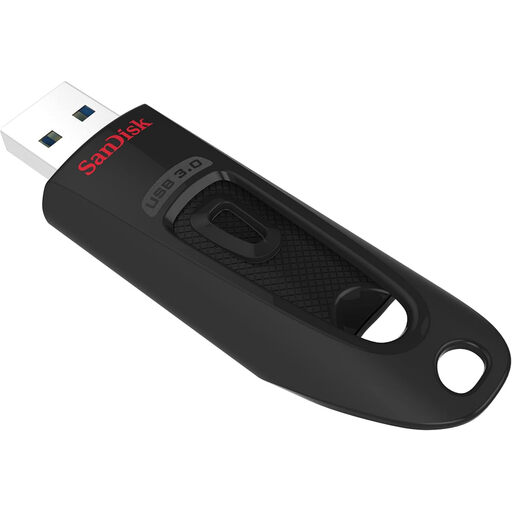
Why This Fits Their Persona: A straightforward option for students, home users and anyone moving documents, photos or music between USB-A computers in the UK.
Its USB 3.0 interface is clearly specified and backwards compatible with USB 2.0 ports, avoiding vague compatibility claims.
64GB capacity, retractable connector and SanDisk SecureAccess software with stated 128-bit AES file encryption.
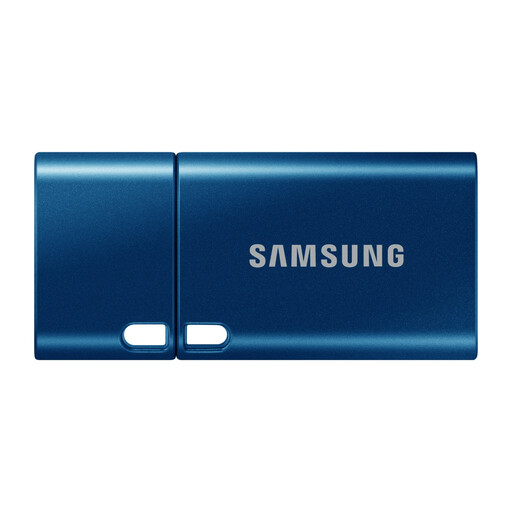
Why This Fits Their Persona: A USB-C storage choice for users who want substantial capacity, a compact metal body and stated protection features for everyday travel.
The product specification identifies USB-C connectivity and a stated read speed of up to 400MB/s, rather than relying on an unexplained speed label.
512GB capacity, USB 3.2 Gen 1 interface, five-year limited warranty and stated IPX7 water-resistance rating.
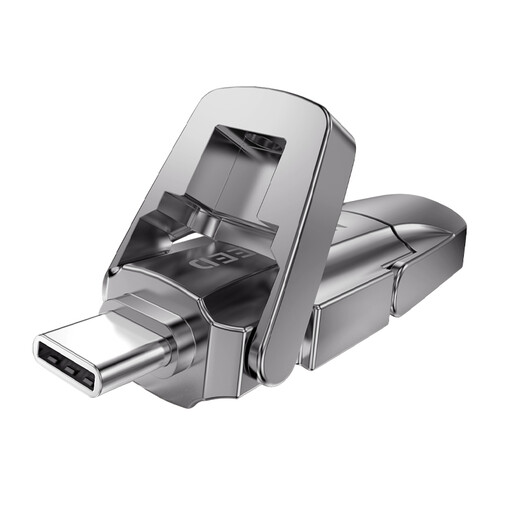
Why This Fits Their Persona: Designed for content creators, mobile users and gamers transferring large files between USB-A and USB-C equipment.
It specifies both connectors and states read speeds up to 1090MB/s and write speeds up to 1030MB/s; actual results still depend on the host device.
512GB 3D NAND Flash storage, USB-A and Type-C connectors, and a zinc alloy sliding housing.
We have compiled a complete, real-time list of products that fully satisfy these strict selection criteria and UK safety regulations.
Lifespan depends on write frequency, storage conditions and build quality. Occasional document transfers may place little stress on the memory, while repeated video recording and deletion can involve much more writing. Replace a drive if it becomes unreliable, disconnects unexpectedly or produces read errors.
You can use a phone flash drive when the phone supports external storage and the connector matches. A USB-C drive may work with compatible iPhones, Android phones and tablets, but software support varies. Check the product listing and your phone’s file-management options before purchasing.
A 1TB USB flash drive can provide convenient space for large video libraries, but sustained recording and editing performance depends on the drive and device. Keep original footage backed up elsewhere, especially for paid projects or irreplaceable recordings.