
24/7 Customer Support

Free returns

Same-day & Next-day Delivery

Quality Guaranteed

Unlock Your Welcome Offers: FREE Delivery | Up to 80% OFF | Free 30-day JoyPlus trial
Download the APP
Tired of fumbling with cables every time you get in your car? You have a modern infotainment system, but that dangling USB cable for Apple CarPlay or Android Auto makes your tidy dashboard look cluttered and dated. A wireless CarPlay adapter promises a simple, elegant solution: get in, start the engine and have your system connect automatically.
However, the market is flooded with options, and not all are created equal. Many UK drivers find themselves disappointed with devices that fail to deliver on their promise of seamless connectivity. Before you buy, it is crucial to understand the common issues that can turn a convenient upgrade into a daily frustration.
Many low-quality adapters are plagued by a few recurring problems. Being aware of these can save you both money and hassle.
The most frequent complaint is performance. A cheap adapter might use outdated wireless technology, resulting in a noticeable delay between tapping your screen and the system responding. Even worse is audio lag during calls or music playback, and random disconnections, especially in areas with heavy wireless interference like city centres.
Many products claim to work with 99% of cars. In reality, compatibility is far more nuanced. These claims often overlook specific vehicle makes (like BMW or Tesla, which use proprietary systems), model years or whether the head unit is factory-fitted or an aftermarket installation. Buying an adapter without verifying its compatibility with your specific car is a gamble.
A small carplay usb dongle has to pack a lot of technology into a small footprint. Poorly designed units can overheat during long drives, especially on warm days, causing them to slow down or shut off completely. Another annoyance is a slow boot-up time; you could be halfway down your street before the adapter finally connects to your phone.
To convert wired CarPlay to wireless effectively, you need to look past the marketing hype and focus on a few core technical specifications.
The connection between the adapter and your phone relies on both Bluetooth and Wi-Fi. Bluetooth is used for the initial handshake, but the heavy lifting—streaming maps, music and interface data—is done over Wi-Fi.
Before adding any adapter to your basket, confirm these three points:
A good adapter should connect to your phone within 15-30 seconds of starting the car. This is often determined by the device's internal processor and software. Also, look for models that support "over-the-air" (OTA) firmware updates. This allows the manufacturer to push out improvements, fix bugs and enhance compatibility with new phones and car software over time, extending the useful life of your carplay dongle.
Instead of a generic list, we have matched some standout in-car tech options to specific UK driver profiles.

Why This Fits Their Persona: This user wants a simple, reliable "plug-and-play" solution to get rid of the cable in their Ford Focus, VW Golf or other common UK car. They value a tidy interior and want the system to just work, every time, without fuss.
It uses both 2.4GHz and 5.8GHz Wi-Fi, which minimises lag and connection drops. The Linux-based firmware is built for stability, and its clear compatibility list (for over 98% of vehicles with factory-wired systems) helps avoid guesswork.
Supports both Apple CarPlay and Android Auto in one device. It also allows for over-the-air firmware updates, ensuring future reliability.
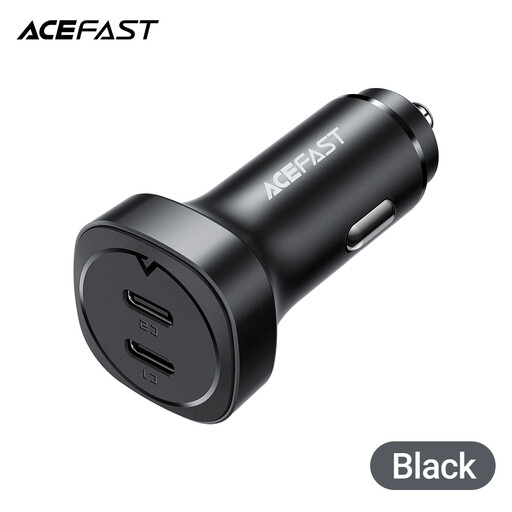
Why This Fits Their Persona: This driver uses their phone heavily for navigation and streaming, and may also need to power a passenger's device or a dash cam. They need a powerful charging solution that can keep up with modern, power-hungry devices.
Unlike basic car chargers that can't even maintain a phone's battery level while using GPS, this delivers a massive 72W total output. It avoids the trap of slow charging that leaves you with a low battery at the end of your journey.
Features two powerful 36W USB-C ports, supporting modern fast-charging standards like Power Delivery (PD). It can fast-charge two flagship smartphones or even a tablet and phone simultaneously.
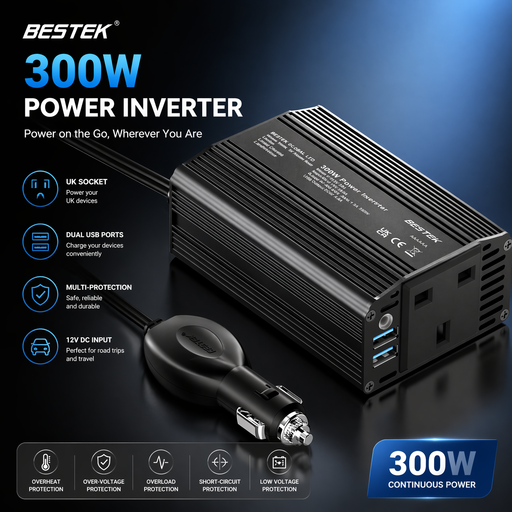
Why This Fits Their Persona: Perfect for family holidays, camping trips or mobile professionals who need to power more than just USB devices. This user might need to charge a laptop, a camera battery or even run a small cooler from their car's 12V socket.
It avoids the limitation of only having USB ports. By converting 12V DC power to 230V AC, it provides a standard 3-pin UK plug socket in your car, alongside two USB ports, offering true versatility for a wide range of electronics.
Delivers 300W of continuous power, enough for most laptops and small appliances. It includes comprehensive safety features like a built-in fuse and overheating protection.
We have compiled a complete, real-time list of products that fully satisfy these strict selection criteria and UK safety regulations.
With a high-quality adapter that uses 5.8GHz Wi-Fi, the lag is minimal and often imperceptible for most tasks like navigation or music control. You might notice a fractional delay of a second when skipping tracks, but for general use, the experience is very smooth. Cheaper, 2.4GHz-only models are more prone to noticeable lag.
No, a properly designed adapter will not drain your car's battery. It powers on when you start the car and draws power from the USB port. When you turn the ignition off, the power to the USB port is cut, and the adapter shuts down completely.
The lifespan depends on build quality and software support. A well-made device with an effective cooling design should last for many years. Choosing a model from a reputable brand that provides regular firmware updates is also key, as it ensures ongoing compatibility and performance improvements.