
24/7 Customer Support

Free returns

Same-day & Next-day Delivery

Quality Guaranteed

Unlock Your Welcome Offers: FREE Delivery | Up to 80% OFF | Free 30-day JoyPlus trial
Download the APP
Finding the right keyboard can feel like a compromise. You want a clean, wireless desk setup, but not at the expense of performance. You need a compact footprint that leaves room for your mouse, but you can't give up essential function keys. And you're looking for that satisfying typing feel that makes both work and play more enjoyable.
A 75% wireless mechanical keyboard offers a solution to these challenges, providing a near-perfect balance of form, function and feel. This guide is designed to help you navigate the key features of these popular keyboards and highlight a few noteworthy options available today.
Before diving into specific models, let's clarify a few technical terms you'll encounter. Understanding these will help you make a more informed decision.
The 75 per cent keyboard layout is a popular choice for a reason. It's significantly more compact than a traditional full-size or even a tenkeyless (TKL) board, freeing up valuable desk space. Unlike even smaller 60% or 65% layouts, it crucially retains the full function row (F1-F12) and a dedicated column of navigation keys like Page Up, Page Down and Delete. This makes it an excellent all-rounder, equally suited for productivity tasks and as a high-performance RGB gaming keyboard.
Why settle for one connection type when you can have three? A tri-mode mechanical keyboard offers maximum versatility.
The way the keyboard's internal components are assembled drastically affects the typing experience. A gasket mount keyboard uses soft, porous material to suspend the main plate-and-PCB assembly within the case. This isolates vibrations and creates a softer, quieter and more cushioned typing feel.
Furthermore, a hot-swappable keyboard is the gold standard for customisation. It features sockets on the circuit board that allow you to change the mechanical switches without any soldering. This means you can easily experiment with different switch types (e.g., linear, tactile, clicky) to find the exact feel and sound you prefer. For advanced users, VIA compatible keyboard software offers powerful, open-source key remapping and macro creation.
Here are a few models that cater to different needs, from the dedicated enthusiast to those just starting to explore compact keyboards.

Why It Stands Out: The Ticktype EVO75 is built for the keyboard enthusiast who wants premium features straight out of the box. Its full aluminium case gives it a substantial, high-end feel, while the leaf spring mount—a variation of gasket mounting—provides a uniquely bouncy and flexible typing experience. It combines this with full tri-mode connectivity and a massive 8000mAh battery for extended wireless use.
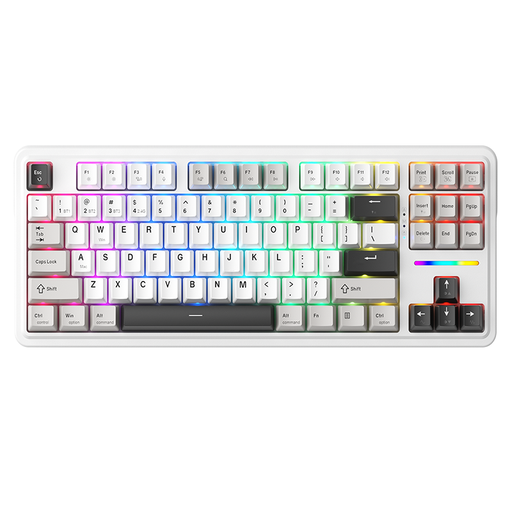
Why It Stands Out: For those who want a slightly more spacious layout without sacrificing modern features, the Machenike KG87 is a compelling option. It uses a tenkeyless (TKL or 80%) layout, which is very similar to the 75% but with more standard spacing between key clusters. Its main draw is the combination of a true gasket mount keyboard structure and versatile tri-mode wireless functionality, offering a premium typing experience at a competitive price point.
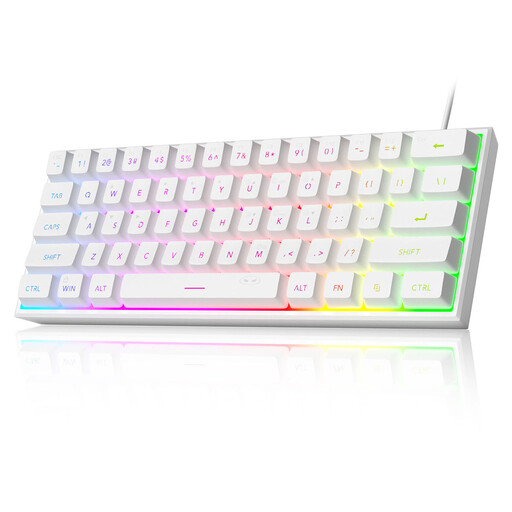
Why It Stands Out: If your main priorities are maximising desk space and affordability, the MageGee TS91 is worth considering. It features an ultra-compact 60% layout, which removes the function row and navigation keys for the smallest possible footprint. It is a wired keyboard and uses membrane keys designed to provide a "mechanical feeling" rather than true mechanical switches.
If these specific models aren't quite what you're looking for, or if you'd like to explore different layouts and features, there are many other choices available.
Explore our full range of keyboards to find your perfect match.
A 75% wireless mechanical keyboard is a compact mechanical keyboard that includes the alphanumeric keys, the function row (F1-F12) and a condensed column of navigation keys. It connects to your computer without a cable, typically using Bluetooth or a 2.4GHz wireless dongle, offering a clean and versatile desk setup.
Many users find a gasket mount keyboard more comfortable for long typing sessions. The gasket material dampens vibrations and creates a softer, less rigid feel with each keystroke compared to more common tray-mount designs. This can result in a more pleasant sound and a less fatiguing experience, making it a popular choice for both gaming and typing.
Tri-mode connectivity means the keyboard can connect to your devices in three different ways: via a traditional wired USB cable, a low-latency 2.4GHz wireless connection using a USB dongle and via Bluetooth. This makes it incredibly versatile for switching between a gaming PC, a work laptop and a tablet without ever having to unplug cables.