
24/7 全天候客户支持

免费退货

当日/次日达

品质保障

开启新人专享福利: 全场免邮 | 低至 2 折 | 免费试用 30 天 JoyPlus 会员
下载 Joybuy
Navigating the world of mechanical keyboards can feel overwhelming. With endless marketing terms and technical jargon, it's easy to end up with a keyboard that's either too loud for your shared office, feels cheap after a few months or simply doesn't fit your desk setup. As your Joybuy Product Recommendation Officer, my role is to help you sidestep these common issues and find a keyboard that genuinely improves your daily typing, gaming or work.
Let's cut through the clutter and focus on what really matters. Here are the most common pitfalls UK buyers face and how to avoid them:
To make a smart purchase, you only need to understand a few key specifications. Forget the marketing fluff and focus on these three non-negotiable features.
The physical size of your keyboard has a huge impact on ergonomics and desk space. Instead of just grabbing a standard model, consider which layout fits your needs.
The switches beneath each key define the entire typing experience. They fall into three main categories:
For ultimate flexibility, look for a hot-swappable keyboard. This feature allows you to easily pull out and replace the switches without any soldering, letting you customise the feel of your keyboard whenever you like.
A keyboard's longevity and typing sound are determined by its construction.
Based on these practical criteria, here are a few recommendations matched to different user needs.
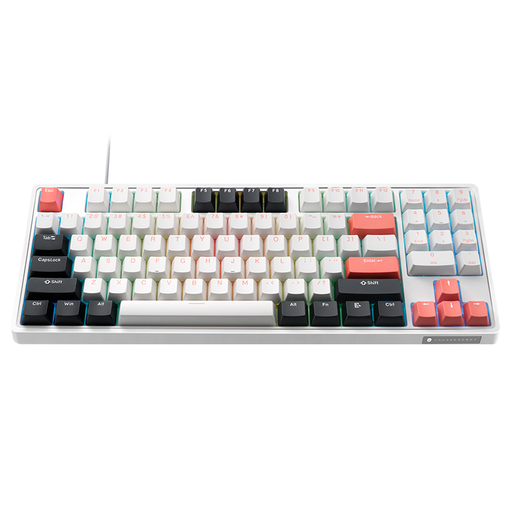
Why This Fits Their Persona: An excellent entry point for anyone new to mechanical keyboards. It provides a reliable, high-quality experience for home or student use without a high price tag, focussing on core features over unnecessary extras.
It comes with durable PBT double-shot keycaps, which directly solves the "shiny keycap problem" common on value boards. The linear red switches are quiet and versatile, avoiding the "loud gaming keyboard" trap.
Features a hot-swappable PCB, allowing you to experiment with different switches later on. The compact 89-key layout saves desk space while keeping a number pad integrated.

Why This Fits Their Persona: Perfect for the modern user who splits time between work and play. Its versatile connectivity and compact size make it ideal for a clean desk setup, easily switching between a work laptop and a gaming PC.
It solves the connectivity mismatch with Tri-Mode wireless (Bluetooth, 2.4G and Wired), offering maximum flexibility. The gasket mount structure and five-layer padding provide a premium sound and feel, far from a hollow, cheap keyboard.
Full-key hot-swappable sockets for customisation, a large 4000mAh battery for long wireless use and a convenient multimedia control knob for quick volume adjustments.
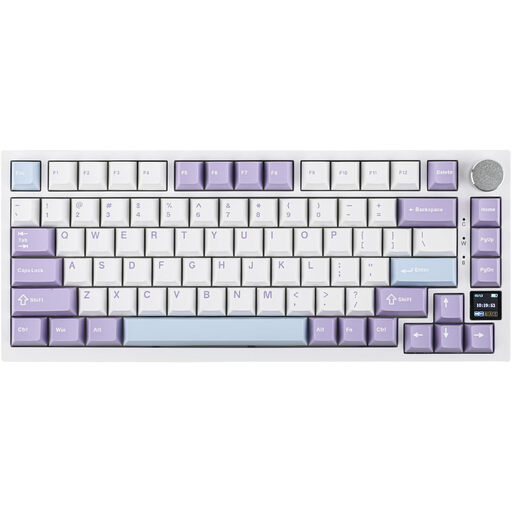
Why This Fits Their Persona: For the user who loves to tinker and wants advanced features. This keyboard is a customiser's dream, offering high-end functionality and aesthetics that can be personalised, including native support for a keyboard for Mac.
It moves far beyond basic "gaming" features with its interactive TFT colour screen, which displays useful info like battery life and connection mode. The premium gasket-mounted structure provides a cushioned, satisfying typing sound.
The TFT screen supports custom GIFs for a personal touch. It also features a hot-swappable PCB, south-facing RGB keyboard lighting for better visibility and seamless switching between Windows and macOS layouts.
We have compiled a complete, real-time list of products that fully satisfy these strict selection criteria and UK safety regulations.
Not at all. The noise level is determined by the switch type, not the keyboard itself. Keyboards with linear switches (often red, black or yellow) are very quiet and produce only a soft sound from the keycap bottoming out. They are perfectly suitable for most office environments. Avoid clicky switches (usually blue or green) if noise is a concern.
A hot-swappable keyboard allows you to change the mechanical switches under the keycaps without any tools or technical skill, specifically without needing to desolder and solder them to the circuit board (PCB). This is a great feature for both beginners and enthusiasts, as it lets you easily try out different switch types (linear, tactile or clicky) to find the perfect feel for your typing style or even use different switches for different keys.
It depends on the model. Many RGB keyboards come with pre-programmed lighting effects and brightness controls that can be accessed directly through key combinations (e.g., Fn + arrow keys). For more advanced customisation, such as creating your own colour patterns or syncing lights with games, you will typically need to install the manufacturer's software. Always check the product description to see what level of control is offered straight out of the box.