
24/7 全天候客户支持

免费退货

当日/次日达

品质保障

开启新人专享福利: 全场免邮 | 低至 2 折 | 免费试用 30 天 JoyPlus 会员
下载 Joybuy
Running out of storage space on your computer is a common frustration. Whether it's a warning that your drive is full just as you're saving an important project, or the slow performance that comes with a cluttered system, the need for more digital room is a familiar problem. A reliable external hard drive is the straightforward solution, providing a simple way to secure your files, expand your device's capacity and take large projects with you.
As a Joybuy Product Recommendation Officer, my role is to help you find practical solutions. This guide cuts through the technical jargon to help you understand your options and choose a storage device that fits your specific needs, from backing up family photos to managing demanding professional workflows.
Before looking at specific models, it's helpful to understand the key features that differentiate them. Considering these points will ensure you select a drive that serves you well for years to come.
The first major choice is between a Solid State Drive (SSD) and a Hard Disk Drive (HDD).
External drives come in two main form factors, each suited to different scenarios.
The interface determines how your drive connects to your computer and its maximum transfer speed. Most modern drives use USB 3.0 (also known as USB 3.2 Gen 1), which offers speeds up to 5 Gbps. Newer, high-performance models may feature a USB-C external drive connection with USB 3.2 Gen 2 or Gen 2x2, offering even faster speeds. Always check that the drive's connection is compatible with your computer, whether it's a PC or a Mac. Many drives formatted for Windows will require reformatting to work with macOS, a simple process done through the Disk Utility application.
Based on features, capacity and user applications, here are some standout options to consider.
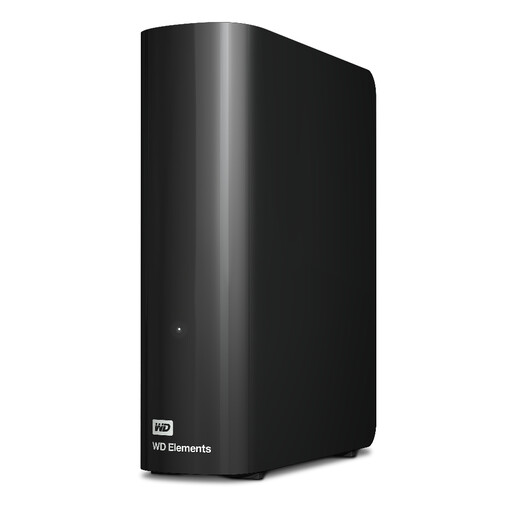
Why It Stands Out: The WD Elements Desktop drive is all about providing massive storage with minimal fuss. With a colossal 12TB capacity, it offers an enormous amount of space for archiving entire digital libraries, from high-resolution photos and videos to complete system backups. Its plug-and-play simplicity for Windows users makes it incredibly accessible—just connect it to power and a USB port and you're ready to go.
Pros:
Who is it for? This is an excellent choice for home users, content hoarders and small businesses who need a vast and dependable desktop hard drive for stationary backup and storage without needing advanced features or portability.

Why It Stands Out: The My Passport has long been a go-to portable hard drive, and this 4TB model continues that legacy. It strikes a great balance between generous capacity and pocket-sized convenience. What sets it apart is its suite of software tools, including automatic backup scheduling and built-in 256-bit AES hardware encryption with password protection, keeping your sensitive files secure wherever you go. It's bus-powered, so you won't need to carry a separate power adapter.
Pros:
Who is it for? This drive is perfect for students, professionals and photographers who need to carry large files securely. Its combination of portability, capacity and security makes it a versatile companion for anyone working on the move.
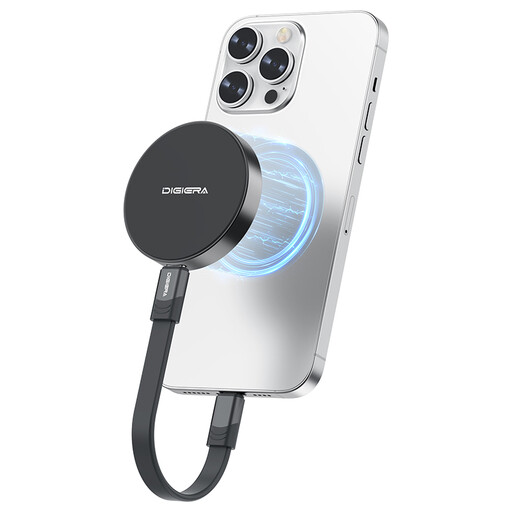
Why It Stands Out: For those who prioritise speed above all else, the DigiEra Magnetic Portable SSD is a compelling option. As a high-performance external SSD with a USB 3.2 Gen 2x2 interface, it delivers read speeds of up to 2000MB/s. Its standout feature is a magnetic ring that allows it to attach directly to an iPhone 15 or 16 Pro, enabling creators to record 4K ProRes video straight to the drive. It's incredibly lightweight and durable, making it a truly modern storage solution.
Pros:
Who is it for? This USB-C external drive is built for mobile content creators, videographers and tech enthusiasts who need blistering-fast performance in a tiny package. It's particularly suited for those in the Apple ecosystem looking to streamline their video recording workflow.
While these three recommendations cover a range of common needs, the world of digital storage is vast. If you're looking for a different capacity, a specific feature or simply want to compare more models, there are many other choices available.
Explore our full collection of Hard Drives and Storage Devices to find the perfect match for your needs.
The primary difference is the technology used. An HDD uses spinning mechanical parts, making it cheaper for high-capacity storage but slower and more fragile. An SSD uses flash memory, which is significantly faster, more durable and quieter, but typically comes at a higher cost per gigabyte.
Often, yes. Most external hard drives are pre-formatted with the NTFS file system for Windows. To use the drive with a Mac, you will need to reformat it to a Mac-compatible format like APFS or HFS+ using the built-in Disk Utility application. This process is quick but will erase all data on the drive, so be sure to do it before you start saving files.
This depends entirely on your use case. For general document storage and light photo backups, 1-2TB is often sufficient. Photographers, gamers or those with a large media library may want to consider 4-8TB. For professional video editing or archiving multiple computers, capacities of 10TB and above provide ample room to grow.