
24/7 Customer Support

Free returns

Same-day & Next-day Delivery

Quality Guaranteed

Unlock Your Welcome Offers: FREE Delivery | Up to 80% OFF | Free 30-day JoyPlus trial
Download the APP
Modern laptops, from the MacBook Pro to the Dell XPS, are celebrated for their sleek, minimalist designs. However, this often comes at the cost of connectivity, leaving users with a limited number of ports. If you find yourself constantly swapping cables to connect an external monitor, transfer files from a USB drive or simply charge your device, you are not alone. A high-quality USB-C hub is the practical solution, consolidating all your essential connections into a single, convenient device.
This guide is designed to help you navigate the technical specifications and marketing jargon. As a Joybuy Product Recommendation Officer, my role is to provide clear, objective advice to help you select a hub that genuinely meets your daily requirements, whether you're working from home, studying or travelling.
Selecting the right Type-C hub involves more than just counting ports. Here are a few key considerations to ensure you find a device that works seamlessly with your setup.
First, take stock of the peripherals you use regularly. A photographer will prioritise SD card slots, while a remote worker might need a stable USB C hub with ethernet for reliable internet. Common ports include:
dual monitor adapter, ensure the hub has multiple video outputs.If connecting to a monitor is a priority, pay close attention to the video specifications. A 4K 60Hz hub offers a smooth, high-resolution experience for most professional and creative tasks. Some advanced hubs even support 4K at 120Hz for ultra-fluid motion, which is beneficial for gaming or high-end video editing. Crucially, ensure your laptop's USB-C port supports DisplayPort Alternate Mode (DP Alt Mode), as this technology is required to transmit a video signal.
A hub with power delivery allows you to charge your laptop through the hub itself, using a single USB-C port for both power and data. Check your laptop's charger to see its wattage (e.g., 65W, 96W). It is advisable to choose a hub that supports a PD input of equal or greater value, such as 100W, to ensure your device charges efficiently while all connected peripherals are in use. The hub itself will consume a small amount of this power (typically 5-15W).
Based on features, connectivity and user applications, here are our recommendations for professionals, students and tech enthusiasts in the UK.

Why It Stands Out: This 10-in-1 hub is a true powerhouse, built for those who demand maximum performance and connectivity. Its standout feature is the dual HDMI output, with one port supporting an impressive 4K@120Hz and the other 4K@60Hz. Combined with ultra-fast 10Gbps USB-A and USB-C data ports and a Gigabit Ethernet connection, it functions as a complete USB-C docking station for a high-performance desk setup.
Pros:
Who is it for? Creative professionals, video editors, software developers and gamers who need to run a demanding multi-monitor setup with high-speed peripherals. It's an ideal MacBook Pro hub for power users.
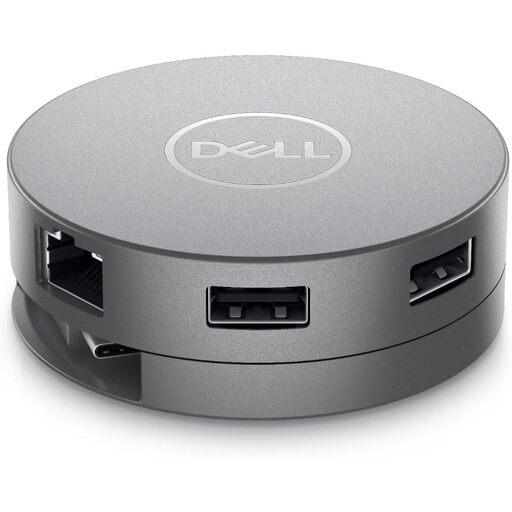
Why It Stands Out: Designed with portability in mind, the Dell DA310 is a compact and lightweight travel adapter. Its unique circular design features an integrated cable management system, making it easy to pack away. It offers remarkable video versatility with HDMI, DisplayPort and even a VGA port, ensuring you can connect to virtually any display you encounter in an office or conference room.
Pros:
Who is it for? Business travellers, consultants and hybrid workers who need a reliable and compact USB C multiport adapter to connect to various displays and peripherals while on the move.
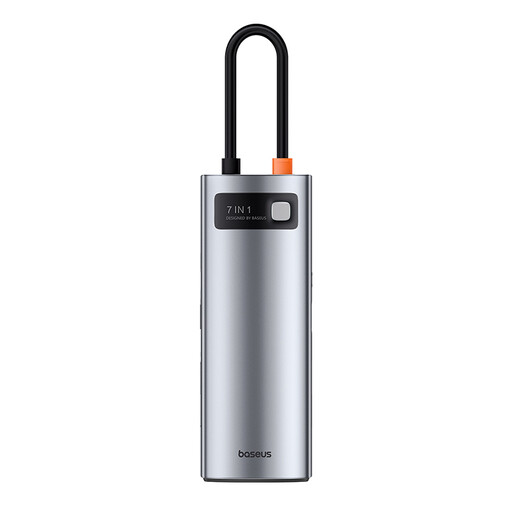
Why It Stands Out: This 7-in-1 hub from Baseus strikes an excellent balance between functionality, performance and form factor. It provides all the essential ports for a modern workflow, including a USB C to HDMI port capable of 4K@60Hz, three USB 3.0 ports for peripherals, and both SD and TF card readers. Housed in a durable metal alloy casing, it’s a dependable daily driver.
Pros:
Who is it for? Students, office professionals and general users who need a versatile and reliable hub for everyday tasks like connecting a monitor, transferring files and keeping their laptop charged.
While these three hubs cover a wide range of uses, your specific needs might call for a different combination of ports or features. For a wider selection, from simple single-port adapters to comprehensive desktop solutions, explore our full range of USB C plug adapters.
For data transfer (connecting a mouse or USB drive), most hubs are universally compatible. However, for video output, your laptop's USB-C port must support DisplayPort Alternate Mode (DP Alt Mode). Most modern high-end laptops (like MacBook Pro/Air, Dell XPS, Microsoft Surface) support this, but it is always best to check your device's specifications before purchasing a hub for monitor connectivity.
The terms are often used interchangeably, but there is a subtle difference. A USB-C hub is typically more compact, powered by the laptop itself (bus-powered) and designed for portability. A USB-C docking station is usually larger, often has its own external power supply and is designed for a permanent desk setup with the ability to support more high-power peripherals simultaneously.
It is normal for a USB-C hub to become warm during operation, especially when handling high-speed data transfers, 4K video output or high-wattage power delivery. Quality hubs are built with metal casings that act as heat sinks to dissipate this warmth safely. Ensure the hub is used in a well-ventilated area and is not covered.