
24/7 Customer Support

Free returns

Same-day & Next-day Delivery

Quality Guaranteed

Unlock Your Welcome Offers: FREE Delivery | Up to 80% OFF | Free 30-day JoyPlus trial
Download the APP
Modern laptops, from the MacBook Pro to the Dell XPS, are celebrated for their sleek, minimalist designs. However, this often comes at the cost of connectivity, leaving you with just one or two USB-C ports. Suddenly, connecting an external monitor, a wired mouse and charging your device all at once becomes a frustrating puzzle. A reliable USB-C hub is the single-cable solution that restores this missing functionality.
As a Joybuy Product Recommendation Officer, my role is to help you navigate the options. This guide will walk you through the key features to consider and present our top recommendations to help you find the right hub for your needs, whether you're working from home, studying or travelling.
Before diving into specific products, it's helpful to understand what separates one hub from another. Focusing on these three areas will ensure you select a device that truly meets your requirements.
Consider the devices you use daily. A good USB C multiport adapter should cater to your specific peripherals.
Many slim laptops use a USB-C port for charging. A USB C hub with power delivery (PD) allows you to charge your laptop through the hub itself, so you don't have to sacrifice a port. Pay close attention to the wattage. For power-hungry devices like a MacBook Pro, a hub offering 100W PD pass-through charging is advisable to ensure your battery charges at full speed while the hub is in use. You will need to pair it with a compatible 100W wall charger and cable.
Your hub will likely travel with you, so a durable build is important. Aluminium casings are common as they are lightweight and help dissipate heat generated during operation. For those who travel frequently, a compact and lightweight design is a priority. For a more permanent desk setup, a larger laptop docking station with more ports might be more suitable.
Here are our recommendations, selected to cover a range of common user needs, from everyday portability to comprehensive connectivity.
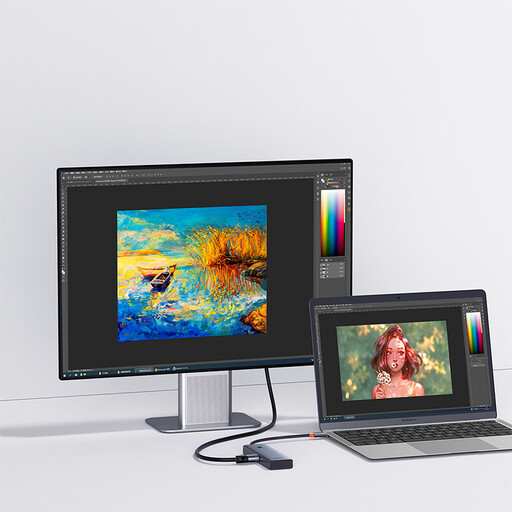
Why It Stands Out: The Baseus UltraJoy hub is an excellent choice for users who need essential connectivity in a compact and portable form. It provides a balanced selection of the most commonly used ports, including three USB 3.0 ports for peripherals and a powerful 100W PD port for uninterrupted charging. A unique feature is its privacy-protection button, which allows you to turn off screen casting with a single press.
Pros:
Who is it for? This hub is ideal for students and professionals who need a reliable, everyday-carry solution to connect a single 4K monitor and essential USB-A devices while keeping their laptop fully charged.
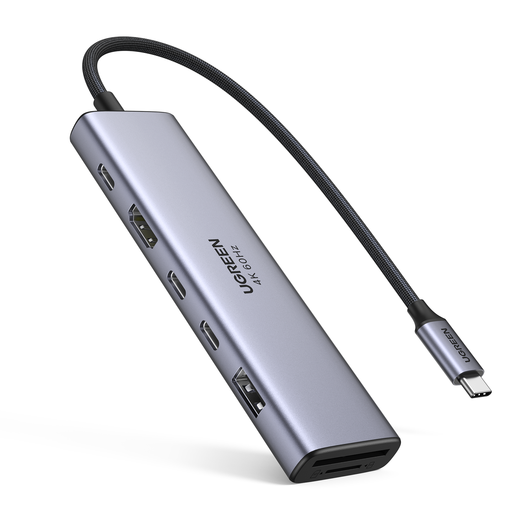
Why It Stands Out: The UGREEN 7-in-1 model is a versatile workhorse designed for users who handle a lot of data. Its main advantage is the inclusion of both SD and TF card slots alongside high-speed USB-A and USB-C 3.2 data ports. This combination makes transferring large files from cameras, drones or external drives quick and efficient.
Pros:
Who is it for? Content creators, photographers and anyone who frequently works with different media formats will find this hub particularly useful. It’s a great all-rounder for a busy desk.
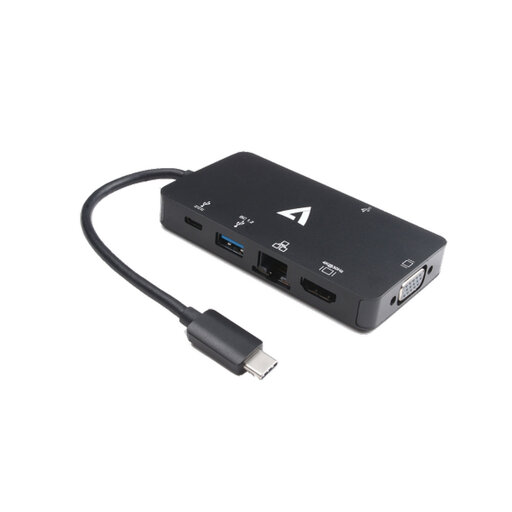
Why It Stands Out: This V7 adapter is built for maximum compatibility and reliability, making it a strong contender for a mobile laptop docking station. Its standout feature is the inclusion of both a 4K HDMI port and a legacy VGA port, ensuring you can connect to virtually any display or projector you encounter. The addition of a Gigabit Ethernet port and 100W PD charging makes it a complete connectivity solution for the travelling professional.
Pros:
Who is it for? This is aimed at business travellers, remote workers and presenters who need to be prepared for any technical setup. If you value stable internet and the flexibility to connect to both old and new displays, this adapter is an excellent choice.
The products above are versatile solutions for common connectivity challenges. However, if your needs are more specific—perhaps you only require a simple video adapter or a different combination of ports—you can explore our full range of HDMI connectors and adapters to find the perfect fit.
1. Will a USB-C hub slow down my devices or internet? A well-made hub should not noticeably slow down your devices. Hubs with dedicated controllers and sufficient internal bandwidth can handle multiple operations at once. For internet speed, using a hub with a dedicated USB C ethernet adapter port will almost always provide a faster and more stable connection than relying on Wi-Fi, especially in crowded areas.
2. Do I really need a USB-C hub with Power Delivery (PD)? If your laptop has only one or two USB-C ports and uses one for charging, then a hub with PD is highly recommended. It allows "pass-through" charging, meaning you can power your laptop and use all the hub's ports simultaneously through a single connection. Without it, you would have to choose between charging your device or connecting your peripherals.
3. Can I use a USB-C hub to connect two external monitors? It depends on the hub. Most standard USB-C hubs support Single-Stream Transport (SST), which means they can only output a single video stream (either mirroring your main display or extending to one external monitor). To drive two independent external displays, you would need a more advanced hub or docking station that supports Multi-Stream Transport (MST), a feature more commonly found on Thunderbolt-compatible devices. Always check the product specifications for its display output capabilities.