
24/7 Customer Support

Free returns

Same-day & Next-day Delivery

Quality Guaranteed

Unlock Your Welcome Offers: FREE Delivery | Up to 80% OFF | Free 30-day JoyPlus trial
Download the APP
Juggling between your work laptop, personal tablet and home PC can quickly lead to a cluttered desk and a disjointed workflow. Constantly pairing and unpairing devices or managing multiple keyboards is inefficient. A wireless multi-device keyboard solves this problem, offering a streamlined way to control all your tech from a single, elegant input device. This guide will walk you through the key features to consider and present our top recommendations to help you find the right keyboard for your needs.
Before diving into specific models, understanding a few key characteristics will help you make a more informed decision.
The physical layout of a keyboard is crucial. While a full-size keyboard includes a dedicated number pad, many users now prefer a more compact keyboard to save desk space and improve ergonomics.
The feel and sound of your typing experience are determined by the switches beneath the keycaps.
Comfort and compatibility are non-negotiable for a device you use daily.
Based on features, user needs and versatility, here are our standout selections for this year.
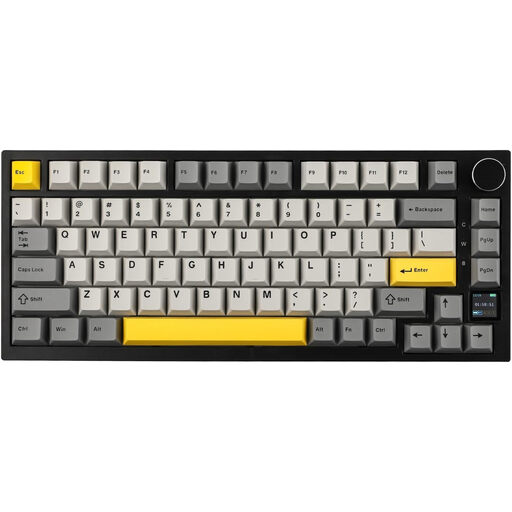
Why It Stands Out: The Ajazz AK820 Pro is a feature-packed keyboard for the modern tech enthusiast. Its most striking feature is the interactive TFT colour screen, which displays vital information like battery life, connection mode and time, and even supports custom GIFs. The 75% compact layout is paired with a premium gasket-mounted structure and sound-dampening foam, delivering a deeply satisfying and cushioned typing sound. With tri-mode connectivity (Bluetooth, 2.4GHz and wired) and a large 4000mAh rechargeable battery, it’s built for high-performance, versatile use.
Pros:
Who is it for? Gamers, programmers and keyboard enthusiasts who crave customisation, a premium typing experience and cutting-edge features.
View Details for the Ajazz AK820 Pro
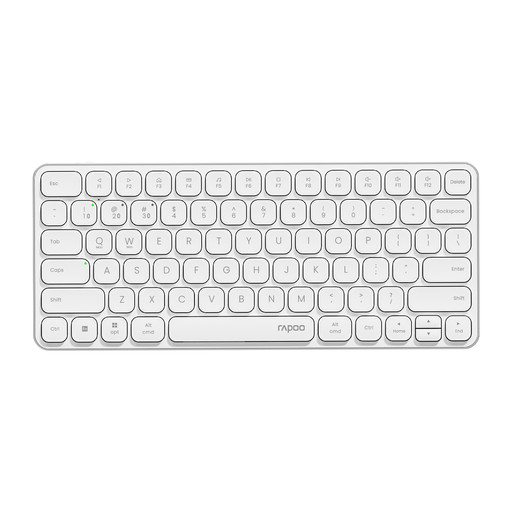
Why It Stands Out: The RAPOO E9050L is the epitome of minimalist efficiency. Its ultra-slim 0.2-inch profile and durable aluminium alloy frame make it both stylish and portable. Designed as a quiet office keyboard, its membrane keys provide a soft and discreet typing experience. It excels at multitasking, allowing you to connect and switch between up to four devices effortlessly. The rechargeable keyboard boasts an impressive battery life of up to 90 days on a full charge, and a quick 10-minute charge provides enough power for a full day's work.
Pros:
Who is it for? Professionals, remote workers and students looking for a sleek, quiet and reliable keyboard for everyday productivity across multiple devices.
View Details for the RAPOO E9050L

Why It Stands Out: For those who prioritise comfort during long workdays, the HP 960 is an exceptional choice. As a certified ergonomic keyboard, its split-zone layout and padded wrist rest encourage a more natural typing posture to reduce muscle strain. A standout feature is the separate wireless numeric keypad, which can be positioned wherever it’s most comfortable or removed entirely to create more mouse space. With 20 programmable keys and seamless multi-device pairing for up to three devices, it’s designed for personalised productivity and long-term comfort.
Pros:
Who is it for? Anyone who spends hours typing each day, from office workers to writers, and is seeking to improve their comfort and reduce physical strain.
View Details for the HP 960 Ergonomic Keyboard
If the models above aren't quite what you're looking for, don't worry. The world of wireless keyboards is vast, with options to suit every preference and budget. From different layouts to unique switch types, your perfect match is out there.
Explore Our Full Collection of Wireless Keyboards
The primary advantage is efficiency. A single wireless multi-device keyboard allows you to seamlessly switch between your computer, tablet and phone with the press of a button. This eliminates desk clutter from multiple keyboards and saves the time and hassle of constantly re-pairing Bluetooth connections.
Yes, most modern multi-device keyboards are designed for cross-platform compatibility. They often feature dedicated keys or on-screen settings (like on the Ajazz AK820 Pro) to instantly switch the layout to match macOS or Windows conventions, ensuring function keys and modifiers like Command/Alt work as expected on each system.
"Better" is subjective and depends on personal preference. A mechanical keyboard provides distinct tactile and auditory feedback that many users find more satisfying and accurate for typing, leading to fewer errors. However, others prefer the soft, low-profile feel of a quiet office keyboard with membrane switches, especially in a shared environment.