For co-operative shooters at a small desk, start with the space available for the screen and stand, then check the refresh rate your device and chosen connection can deliver. A 24.5-inch Full HD monitor suits a compact, speed-focused setup; a 27-inch QHD monitor offers more image detail if it fits; and a 27-inch Full HD model is another high-refresh option if QHD is not a priority. Variable refresh rate (VRR) also depends on compatible output hardware and settings.
Who these choices suit
Players working around limited desk space
If keyboard and mouse room is tight, a compact screen and an adjustable stand may matter more than extra display area. Dell UK lists the 24.5-inch Alienware AW2525HM with a 320Hz DisplayPort mode and height adjustment.
Co-op players who also want more image detail
If sharper maps and interface details matter alongside fast play, consider a 27-inch QHD screen after checking its footprint and your intended connection. ASUS ROG UK lists the XG27ACS at 2560 × 1440 and up to 180Hz, with a stand depth of 21.88 cm.
Players considering 27-inch Full HD
If screen size and high refresh matter more to you than QHD resolution, a 27-inch Full HD model is another route. LG UK lists the UltraGear 27GS60F-B at 1920 × 1080 and 180Hz, with G-SYNC Compatible and FreeSync support.
What to check before choosing
Compact Full HD
Consider it when: desk space is tight and high-refresh shooter play matters more than a larger, sharper screen.
Trade-off: a 24.5-inch Full HD screen has less display area and fewer pixels than a 27-inch QHD option.
27-inch QHD
Consider it when: you want more image detail and can accommodate the particular monitor and stand.
Trade-off: a 27-inch setup needs a careful fit check on a small desk, and its available refresh rate depends on the connection.
27-inch Full HD
Consider it when: you want a larger screen and high refresh without making QHD detail a requirement.
Trade-off: it retains the Full HD pixel count across a larger panel and still needs room for its stand.
| Concern |
What to check |
Who this matters to |
| Desk space and positioning |
Measure usable desk width and depth with the keyboard and mouse in place. Compare stand dimensions and adjustment options for the exact model. |
If my mouse space is already limited, I need the screen and stand to fit without crowding my controls. Around 27% of consumers would put desk space and positioning first. |
| Image detail and speed |
Choose between compact Full HD and a larger QHD screen, then check whether your device can output the resolution and refresh rate you intend to use. |
I want clearer maps and interface details, but I still care about fluid shooter play. About 33% of consumers would make that balance their primary concern. |
| Connection and VRR |
Check the source device, cable, per-input refresh limits and compatibility with the intended VRR mode. |
When I switch between devices or rely on HDMI, I need to know which display modes will work with my setup. Roughly 20% of consumers would prioritise connection and VRR compatibility. |
| Features for longer sessions |
Compare panel type, stand adjustment and the modes you expect to use; do not treat response-time or HDR labels as directly comparable without their conditions. |
I would rather have a screen I can position comfortably than choose solely by its maximum refresh-rate label. Around 20% of consumers would put these everyday-use features first. |
Buying pitfalls
-
Assuming every input reaches the headline refresh rate
Dell UK lists the Alienware AW2525HM at 320Hz through DisplayPort and 255Hz through HDMI. ASUS ROG UK lists the XG27ACS at up to 180Hz through DisplayPort or USB-C, but up to 144Hz through HDMI.
Check the monitor’s per-input modes against the port and cable you will actually use.
-
Choosing by diagonal size alone
A 27-inch screen may fit while its stand takes up too much usable desk depth. ASUS ROG UK lists the XG27ACS at 61.48 cm wide and 21.88 cm deep with its stand.
Measure the desk with your controls in place, and check the exact stand dimensions before ordering.
If the stand crowds the desk, using a monitor arm may require a compatible mount and a suitable place to attach it.
-
Expecting VRR to work automatically
ZOWIE UK explains that a monitor needs a graphics card to output a compatible signal for VRR; the display feature alone cannot enable it.
Check graphics-hardware support, the chosen input and the relevant monitor and device settings.
Relevant brands for reference
Alienware
The AW2525HM illustrates a compact, high-refresh Full HD option.
- Dell UK lists a 24.5-inch Fast IPS panel, 320Hz through DisplayPort and stand adjustment.
- The listed HDMI maximum is 255Hz rather than the DisplayPort maximum of 320Hz.
ASUS ROG
The XG27ACS illustrates a 27-inch QHD route with published dimensions for a desk-fit check.
- ASUS ROG UK lists 2560 × 1440, up to 180Hz, 0–120 mm height adjustment and a 21.88 cm stand depth.
- Its HDMI input is listed up to 144Hz, and its stand still needs to fit your desk.
LG UltraGear
The 27GS60F-B illustrates a 27-inch Full HD alternative to a QHD screen.
- LG UK lists 180Hz, IPS, G-SYNC Compatible and FreeSync support for this model.
- It has Full HD rather than QHD resolution; check whether its tilt-adjustable stand meets your positioning needs.
ZOWIE by BenQ
The XL2566X+ illustrates a specialist, compact FPS-oriented option rather than a general-purpose QHD route.
- ZOWIE UK lists a 24.5-inch Fast TN panel, 400Hz, DyAc 2 and height adjustment.
- Its motion-clarity approach is a model-specific choice; do not treat the refresh-rate figure alone as a comparison of overall image quality.
Joybuy monitor choices
These Joybuy choices focus on QHD monitors for players who want more image detail alongside high refresh. Check each model’s stand footprint and the modes available through your device’s connection before deciding whether it suits a small desk.
 No image available
Samsung Odyssey G6 S27DG612 27-inch QHD OLED 240Hz monitor
Consider this model if you want a 27-inch QHD screen with the 240Hz refresh rate stated in its product name. Check the stand footprint against your available desk space and confirm which input and source-device combination supports the mode you want.
View on Joybuy
 No image available
MSI MAG 271QP QD-OLED X28 27-inch QHD 280Hz monitor
This is another QHD choice for a player seeking high refresh, with 280Hz stated in its product name. Measure the intended space and check the actual stand dimensions, per-input modes and compatibility with your source device.
View on Joybuy
 No image available
MSI MAG 274QF 27-inch WQHD 180Hz Rapid IPS monitor
Consider this 180Hz WQHD model if QHD detail matters more to you than choosing by the highest stated refresh rate. Confirm the stand footprint and check the refresh mode available through the connection you plan to use.
View on Joybuy
 No image available
HKC G27H2DPro 27-inch QHD Fast IPS 220Hz monitor
This 27-inch QHD model lists 220Hz in its product name for players considering a high-refresh screen. Check the monitor and stand measurements against your desk, then confirm the supported mode for your chosen input.
View on Joybuy
 No image available
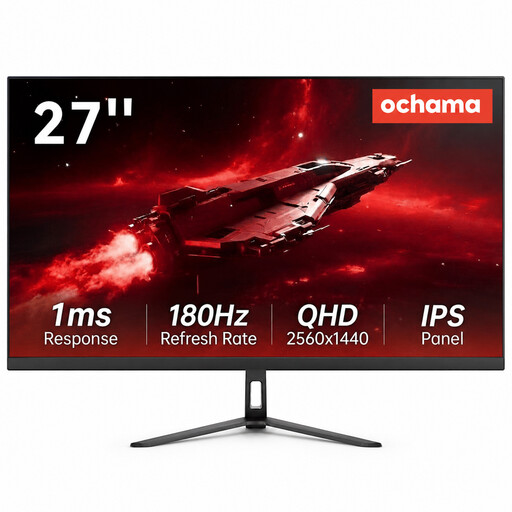
Ochama 27-inch QHD IPS 180Hz gaming monitor
Consider this 27-inch QHD IPS option if a 180Hz screen matches your intended setup. Check its stand dimensions, adjustment options, VRR support and the refresh mode available through your device’s input before ordering.
View on Joybuy
Frequently asked questions
Will a monitor always reach its advertised maximum refresh rate?
No: the available rate can depend on the input and source device. Dell UK lists the AW2525HM at 320Hz through DisplayPort but 255Hz through HDMI; ASUS ROG UK lists the XG27ACS at up to 180Hz through DisplayPort or USB-C but up to 144Hz through HDMI.
Does VRR require a compatible graphics card?
Yes, VRR needs a compatible signal from the graphics hardware as well as a suitable monitor mode. ZOWIE UK advises checking the graphics-card output; also check the connection and the relevant device and monitor settings.
How can I tell whether a 27-inch monitor fits my desk?
Measure usable width and depth with your keyboard and mouse in place, then compare the exact monitor’s dimensions with its stand. ASUS ROG UK lists the XG27ACS at 61.48 cm wide and 21.88 cm deep with its stand; a monitor arm is an alternative only if the monitor, arm and desk are compatible.
What should I check on the product page before ordering?
Confirm the exact model and variant, the seller’s return and warranty terms, its approach to pixel faults, and whether the cable needed for your intended connection is included. Check current availability on the live listing rather than assuming that a product page means the monitor can be ordered.


