
24/7 全天候客户支持

免费退货

当日/次日达

品质保障

开启新人专享福利: 全场免邮 | 低至 2 折 | 免费试用 30 天 JoyPlus 会员
下载 Joybuy
Moving files between your new USB-C laptop and an older desktop computer can be a frustrating task. You might find yourself emailing files back and forth or relying on slow cloud uploads. A dual USB flash drive is a simple and effective solution, offering both the modern USB-C and the traditional USB-A connectors in a single, compact device.
As a Joybuy Product Recommendation Officer, my role is to help you find practical tools that solve everyday tech problems. This guide will walk you through the key features to consider when choosing a flash drive for your phone and computer, and I will share some of our top recommendations to make your decision easier.
Before you buy, it's helpful to understand a few key specifications. This ensures the drive you choose will meet your needs for speed, capacity and compatibility.
The primary benefit of a dual drive is its versatility. One end features a standard USB-A plug, which fits most desktop computers, older laptops and car audio systems. The other end has a smaller, reversible USB-C plug, which is now the standard for modern laptops (including MacBooks), tablets and many Android and iPhone models. A USB C thumb drive with a dual interface eliminates the need for adaptors, providing a seamless way to transfer data across all your gadgets.
Not all flash drives are created equal when it comes to speed. A high speed flash drive using the USB 3.2 standard can transfer large files, like 4K videos or extensive photo libraries, in a fraction of the time it would take a USB 2.0 drive. When checking specifications, look for read and write speeds measured in megabytes per second (MB/s). Higher numbers mean faster performance, which is crucial if you frequently work with large files or need to back up your devices quickly.
Capacity is a straightforward choice: how much space do you need? A 64GB drive is often sufficient for documents and a modest number of photos. For larger media collections, system backups, or professional use, a 256GB USB drive or even a 512GB model offers more breathing room. Additionally, consider the build quality. A metal USB drive typically offers better durability and heat dissipation compared to plastic models, making it a more reliable piece of portable storage for daily use.
Here are a few options that cater to different needs, from everyday use to high-performance professional workflows.
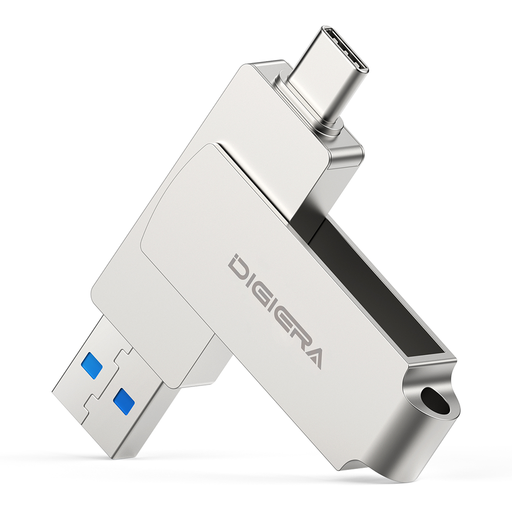
Why It Stands Out: The DigiEra LUS320 strikes an excellent balance between high capacity, speed and practical design. Its dual-interface and USB 3.2 Gen 1 performance make it a versatile workhorse for moving files between almost any device. The 360° swivel casing protects the connectors without a separate cap that could be easily lost.
Pros:
Who is it for? This drive is ideal for students, office professionals and everyday users who need a reliable, high-capacity type c memory stick for backing up data and transferring files between their phone, tablet and computer.
View Product Details on Joybuy.co.uk
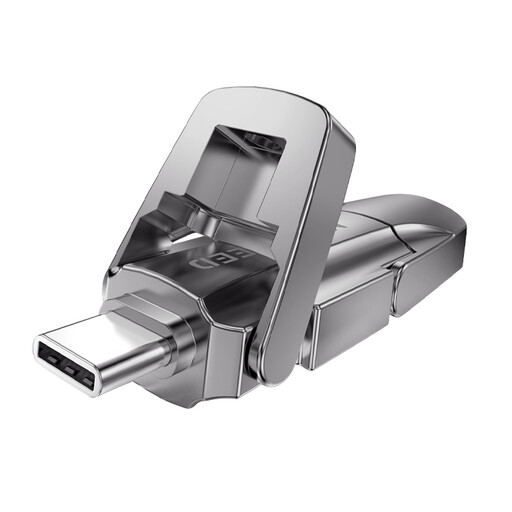
Why It Stands Out: The MOVESPEED YSUYVP10 is engineered for maximum performance, delivering speeds that rival some external SSDs. With read speeds up to 1090MB/s, it is designed for professionals who cannot afford to wait. It supports direct recording of 4K ProRes video from compatible iPhones, streamlining the workflow for content creators.
Pros:
Who is it for? This high speed flash drive is built for content creators, video editors and tech professionals who need the fastest possible transfer speeds for managing large files and demanding workflows.
View Product Details on Joybuy.co.uk
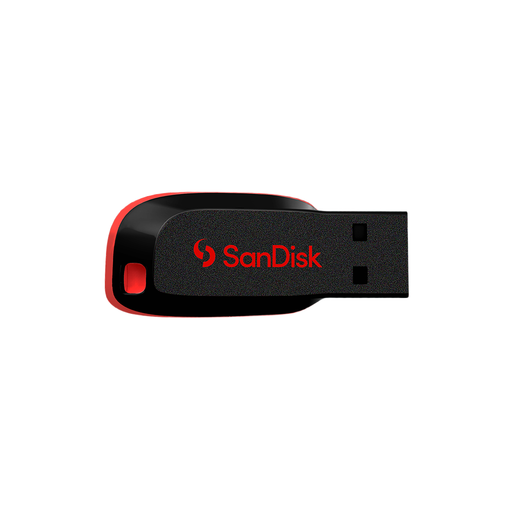
Why It Stands Out: While not a dual-interface drive, the SanDisk Cruzer Blade is a dependable and highly portable option for basic storage needs. Its compact design and simple plug-and-play functionality make it a go-to choice for carrying documents, music and photos. It represents a straightforward, affordable solution for users who primarily use devices with standard USB-A ports.
Pros:
Who is it for? This drive is perfect for students and general users who need a simple, low-cost USB-A drive for documents, school projects, or sharing files with devices that don't require a USB-C connection.
View Product Details on Joybuy.co.uk
If the recommendations above don't quite match what you're looking for, or if you'd like to explore different capacities and designs, there are many other choices available. From ultra-compact drives to models with enhanced security features, you can find a device that fits your specific requirements.
Browse our full collection of USB storage to see more options.
A dual USB flash drive is primarily used for transferring files easily between devices that have different USB ports. With both a USB-A and a USB-C connector, you can move photos, videos and documents from a new laptop to an old PC, or from your smartphone to your desktop, without needing any adaptors.
Yes, provided it is a dual-interface drive. A type c memory stick with both connectors allows you to plug it directly into a compatible smartphone (like most modern Android phones and iPhone 15 or newer) and then into a computer's USB-A or USB-C port. This makes it an incredibly versatile tool for backups and file sharing.
In many cases, yes. A metal USB drive casing generally provides superior protection against accidental drops, bumps and daily wear. The metal also acts as a heat sink, helping to dissipate warmth generated during prolonged, high-speed data transfers, which can contribute to the drive's overall longevity and performance stability.