What to check before buying
Start with the input your games actually require. Then check whether the controller connects to your computer in a way that preserves any features you intend to use.
| Concern |
What to check |
Who this matters to |
| Game support |
Check each game’s controller-support label and description for interactions that still require typing or a mouse. |
If I want to play from my chair with a gamepad, I need my usual titles to support the actions I use. Around 40% of consumers would put game compatibility first. |
| Text-entry workflow |
Look for written commands or free-form responses, and leave room to reach your keyboard. |
When writing my own responses is part of the game, I do not want a controller purchase to make typing awkward. Roughly 30% of consumers would prioritise that keyboard-first workflow. |
| Device and connection |
Confirm operating-system support, the required USB port or wireless method, and any feature-specific wired requirement. |
If I move between devices or use controller audio, the connection has to suit my desk and the features I need. About 30% of consumers would make device and connection fit their primary concern. |
Controllers for a home-office desk
These controllers offer PC-focused or PC-and-Mac options for games you have checked for controller support. Keep a keyboard accessible for interactive fiction that asks you to type.
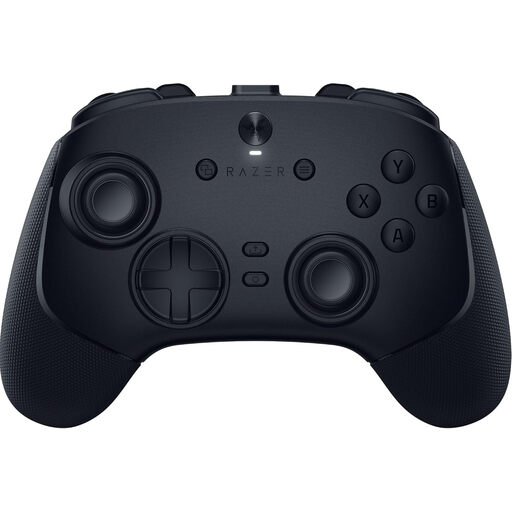 No image available
Razer Wolverine V3 Pro Wireless Esports Controller (PC)
Consider this PC controller if you want a wireless gamepad for supported narrative games. Check your games’ input requirements before expecting to put the keyboard away.
View on Joybuy
 No image available
Xbox Wireless Controller – Robot White
For a Windows desk, this controller offers the USB, Bluetooth and Xbox Wireless Adapter routes documented by Xbox Support. Choose USB or the adapter rather than Bluetooth if you need controller audio or attached accessories.
View on Joybuy
 No image available
Turtle Beach PDP Victrix Pro BFG Wireless Controller – Black
Consider this wireless model if you play supported narrative games on a Windows 10/11 PC. Its product variant is also named for Xbox Series X|S and Xbox One; check the input requirements of the games you intend to play.
View on Joybuy
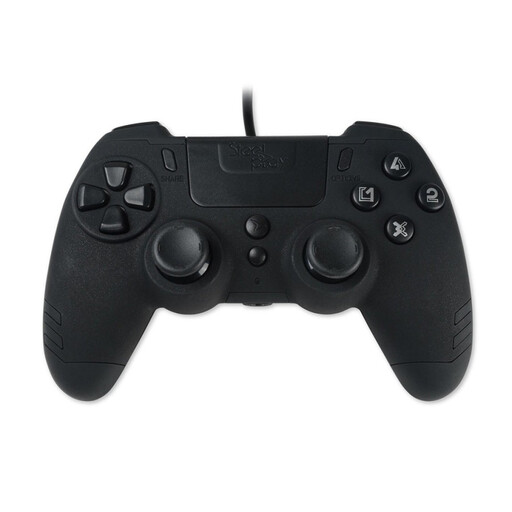 No image available
LEXIP SteelPlay Slim Pack Wired Controller – Ebony Black
A wired controller to consider if you prefer a cable at your desk. Confirm that your computer and games suit this model; its wired designation should not be mistaken for a wireless option.
View on Joybuy
 No image available
Sony DualSense Wireless Controller – HYPERPOP Techno Red
Consider this variant if you want a controller for a supported Windows PC or Mac setup. PlayStation Support lists USB-C and Bluetooth connections; PC haptic feedback requires USB, and adaptive triggers depend on game support.
View on Joybuy
Frequently asked questions
Can I play every interactive-fiction game entirely with a controller?
No. Check each game’s store listing and description: Steam shows both partial and full controller-support labels for interactive and narrative titles, and OMEA invites players to type what they want to do despite listing full controller support.
Should I use Bluetooth or a cable at my desk?
Choose by the features you need, not just the space on your desk. Xbox Support says controller audio and attached accessories are unsupported over Bluetooth; PlayStation Support says DualSense haptic feedback on PC requires USB and its headset jack requires a wired PC or Mac connection.
What cable do I need to connect an Xbox controller to a PC?
Use a USB cable that supports data transfer for a wired Windows connection. Xbox Support lists USB as a PC connection method; check that your cable is not designed only for charging.
What if a controller I buy in the UK is faulty?
A faulty controller may give rise to statutory remedies, separate from a retailer’s change-of-mind policy. GOV.UK identifies faulty goods as an area covered by the Consumer Rights Act 2015; keep your order details and contact the seller about the fault.
How should I dispose of an old rechargeable controller?
Do not put the controller or its battery in household rubbish. GOV.UK advises recycling unwanted electrical products and batteries through an appropriate collection point.


