Buying priorities
Start with the seat system, then choose the shortest compatible connection chain. A cable or adapter is useful only when its connector matches the confirmed screen output.
| Priority |
What to check |
Your needs |
| Seat-screen connection |
Confirm the operating carrier, flight number, scheduled aircraft and cabin. Check whether the airline specifically states Bluetooth audio for that screen. |
I want headphones that connect to the screen on my booked flight, not just to my phone. Virgin Atlantic, Emirates and United describe Bluetooth screen pairing only for particular aircraft or selected flights. |
| Wired fallback |
Check that the exact headphone model includes or supports an analogue cable. Identify the headphone-side and source-side connector sizes before replacing a cable. |
I use wireless headphones with my own device but want a physical backup if seat-screen Bluetooth is unavailable. A detachable cable keeps the wired option open. |
| Adapter or transmitter |
Establish whether the seat has a standard single headphone socket or needs an adapter. For a transmitter, check the headphone output, charging requirement and pairing process. |
I want the least complicated setup that will work. Use direct Bluetooth when confirmed, cable alone when possible, and add an adapter or transmitter only when the confirmed socket requires it. |
| Flight-phase use |
Follow onboard instructions for Bluetooth headphones and transmitters. Switch them off when crew instructions require it and resume use only when permitted. |
I need to plan for restricted phases of the flight. British Airways and Virgin Atlantic state that Bluetooth headphones must be switched off for taxi, take-off and landing. |
Joybuy product options
Joybuy options for a wired seat-screen route or wireless headphones with a documented cable fallback.
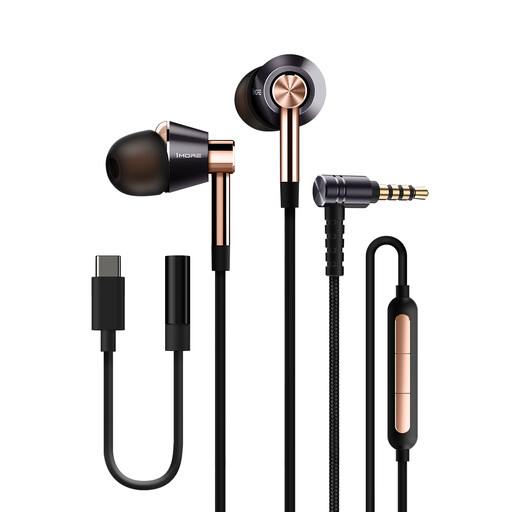 Image unavailable
1MORE E1001 Triple Driver In-Ear Earphones
A compact wired option for seat-back entertainment where Bluetooth is not confirmed.
The package lists a dual-prong airline adapter, multiple silicone and foam tips, a travel case and in-line controls. Confirm that the adapter matches the connector on your booked aircraft; check the earphone plug type if you need another adapter or an extension.
Joybuy
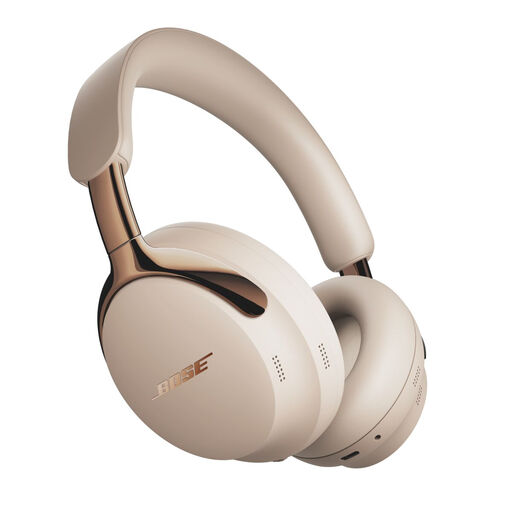 Image unavailable
Bose QuietComfort Ultra Headphones (2nd Gen)
For wireless listening with a physical cable fallback when seat-screen Bluetooth is uncertain.
Bluetooth connectivity and a supplied 3.5 mm-to-2.5 mm audio cable are listed. The cable has a 3.5 mm source-side plug and 2.5 mm headphone-side plug; confirm whether your seat socket needs a separate airline adapter and follow crew instructions for Bluetooth use.
Joybuy
Frequently asked questions
Can Bluetooth headphones connect directly to an airline seat-back screen?
Sometimes, but only where the exact aircraft and cabin have Bluetooth-enabled entertainment. Virgin Atlantic lists Bluetooth audio on A330neo seat-back screens, Emirates states that personal Bluetooth headphones can pair on its latest A380 aircraft, and United limits the feature to select flights. Confirm the scheduled aircraft and onboard amenities before relying on this route.
Can I use Bluetooth headphones or a transmitter during take-off and landing?
Follow the crew's instructions. British Airways says Bluetooth devices such as wireless headphones must be switched off for taxi, take-off and landing; Virgin Atlantic gives similar instructions for Bluetooth headphones.
Do I need an airline headphone adapter?
Only if the confirmed seat audio socket is not a standard single headphone connection compatible with your cable. A flight adapter lets headphones with a 3.5 mm plug connect to an aircraft system requiring that adapter; it is not automatically needed on every aircraft.
Will a Bluetooth transmitter work with every airline screen?
No. A transmitter such as AirFly Pro 2 is designed to connect Bluetooth headphones to a standard headphone jack. It cannot by itself solve a non-standard seat connector, a disabled audio jack or an airline instruction restricting use, so confirm the seat output and carry any required adapter separately.
How should I verify compatibility before leaving for the airport?
Check the operating carrier and flight number, then look up the scheduled aircraft and cabin on the airline's own fleet or onboard-entertainment information. If Bluetooth audio is not confirmed, inspect your headphone model's cable and connector sizes and ask whether the seat uses a standard single headphone socket or needs an adapter. Aircraft substitutions and cabin changes remain possible, so take the airline-supplied headset or a wired backup where practical.


