Who needs which connection?
The useful starting point is where your audio will come from: the seat-back screen, your own device, or both.
Travellers using seat-back entertainment
If you want to listen through the aircraft screen, check its connection before relying on your own headphones. TUI UK confirms that its Boeing 787 provides a headset, but its aircraft information does not identify a personal-headphone socket or promise Bluetooth pairing.
Bluetooth-headphone owners considering a transmitter
A transmitter needs a compatible seat audio output as well as permission from the operating airline. An airline allowing Bluetooth headphones with a personal device does not, by itself, establish that you can connect a transmitting accessory to the seat screen.
Travellers switching between screens and devices
If you plan to alternate between onboard entertainment and downloaded content, consider a model-specific analogue cable for a confirmed compatible seat output. Keep your phone or tablet ready as a separate listening option when the onboard connection is uncertain.
What should you check before buying?
Confirm the seat connection first, then match the headphone and cable to it. Check wireless-use rules separately: they do not tell you what the seat-back system can connect to.
| Priority |
What to check |
Your needs |
| Seat connection |
Ask the operating airline about the audio connection for your aircraft and cabin. Confirm personal Bluetooth pairing or the actual wired output rather than assuming either is fitted. |
I want to use my headphones with the seat-back screen, not just my phone. Virgin Atlantic describes Bluetooth headphone connections at The Loft touchscreens on its A330neo; that does not establish pairing at every passenger seat. |
| Cable fit |
Match the cable to the exact headphone model and the confirmed aircraft-side output. Check what comes with the retail variant you intend to buy. |
A wired fallback matters to me if the seat has a compatible output. The plug that fits the aircraft also needs a cable that connects to my headphones. |
| Adapter or transmitter |
Identify the seat connector before choosing an adapter or transmitter. Ask the operating airline specifically whether an external transmitter is permitted on your flight. |
I would consider an accessory if my existing headphones cannot connect directly, but only after confirming that it suits the seat equipment and is allowed onboard. |
| Wireless-use rules |
Check the operating airline’s current instructions and follow the crew’s directions. British Airways says Bluetooth devices must be switched off for taxi, take-off and landing; Virgin Atlantic gives take-off and landing restrictions for Bluetooth headphones used with passengers’ own devices. |
I plan to listen through my own device during permitted parts of the flight and need to know when its wireless headphones must be switched off. |
| Personal-device fallback |
Download content before departure and confirm how your headphones connect to your phone or tablet. Bring the correct model-specific cable if your planned fallback requires one. |
If the seat connection does not suit my headphones, I still want an audio option on my own device, subject to the airline’s instructions. |
Brand and model references
These manufacturer examples help identify model-specific cable routes; they do not establish compatibility with your booked seat. The Bose QuietComfort Ultra documentation discussed here should not be assumed to describe every QuietComfort variant.
Sony
Sony UK documents a supplied headphone cable for the WH-1000XM6.
- Sony says inserting the cable can turn this model’s Bluetooth function off and removing it can turn Bluetooth on.
- The supplied cable does not establish that the audio output at your aircraft seat will accept it.
Bose
Bose UK lists a 3.5 mm-to-2.5 mm audio cable with QuietComfort Ultra Headphones.
- The stated cable provides a model-specific analogue connection to check against a confirmed seat output.
- Confirm the connector and included accessories for the exact Bose model and generation you are considering; this listing does not establish aircraft or transmitter compatibility.
Sennheiser
Sennheiser UK lists a 1.2 m auxiliary cable for MOMENTUM 4 Wireless. Its model manual describes a 3.5 mm-to-2.5 mm analogue cable and an in-flight adapter.
- The auxiliary cable gives buyers a specified wired route to assess alongside Bluetooth use with a personal device.
- Check the accessories in the exact UK retail package: the UK product listing does not itself list an in-flight adapter in the box.
Joybuy headphone options
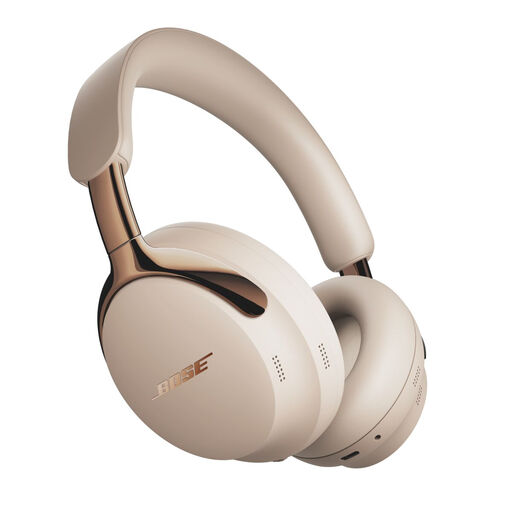
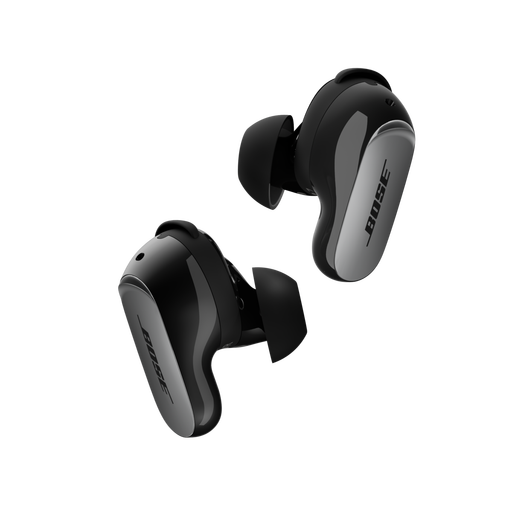
These two Bose QuietComfort Ultra (2nd Gen) options address different parts of the journey: over-ear headphones to consider when checking a cable-based seat connection, and earbuds for Bluetooth listening with your own device. Neither product listing establishes the connection at your booked aircraft seat.
 No image available
Bose QuietComfort Ultra (2nd Gen) Wireless Headphones — Driftwood Sand
Consider this over-ear model if you want Bluetooth for your own device and are checking a wired route for seat-back audio.
Confirm the cable and accessories supplied with this exact 2nd Gen variant, then match the required plug to the output on your operating aircraft. Follow the airline’s rules for Bluetooth use; headphone permission does not establish transmitter permission.
View on Joybuy
 No image available
Bose QuietComfort Ultra (2nd Gen) Wireless Earbuds — Black
These Bluetooth earbuds are an option for listening to downloaded content on your own device during permitted parts of the flight.
Do not rely on them for seat-back audio without confirming personal Bluetooth pairing for your aircraft and cabin, or another connection route suitable for this exact model. Follow the operating airline’s wireless-use instructions.
View on Joybuy
Flight headphone questions
Can I pair my Bluetooth headphones directly with a seat-back screen?
Only if personal pairing is available at your seat. Virgin Atlantic describes Bluetooth headphone connections at The Loft touchscreens on its A330neo, not at every seat or on every aircraft. TUI UK confirms a headset is supplied on its Boeing 787 but does not identify personal Bluetooth pairing, so check your operating aircraft and cabin.
Does permission to use Bluetooth headphones cover a seat-screen transmitter?
Do not assume it does. British Airways and Virgin Atlantic describe Bluetooth-headphone use under flight-phase restrictions, but their cited headphone guidance does not specifically approve an external transmitter plugged into in-flight entertainment. Ask the operating airline about that accessory and follow crew instructions.
Which cable should I take for wireless over-ear headphones?
Take the cable specified for your exact model, then check that its other end suits your confirmed seat output. Bose UK lists a 3.5 mm-to-2.5 mm cable with QuietComfort Ultra Headphones, Sennheiser documents a 3.5 mm-to-2.5 mm analogue cable for MOMENTUM 4 Wireless, and Sony UK refers to a supplied cable for WH-1000XM6. Check the exact variant and package rather than transferring one model’s accessories to another.
Can I use Bluetooth accessories throughout the flight?
Follow the operating airline’s current instructions and cabin crew directions. British Airways says Bluetooth devices must be switched off for taxi, take-off and landing; Virgin Atlantic says Bluetooth headphones used with passengers’ own devices must be switched off during take-off and landing. Those headphone rules do not settle whether a separate transmitter is permitted.


