Joybuy Insights

Choosing a Mechanical Keyboard: A UK Buyer’s Guide

If you spend a significant amount of time at your computer, you have likely considered upgrading from the standard keyboard that came with your PC. The world of mechanical keyboards can seem complex, with a vast array of sizes, switches and features. Whether you are a competitive gamer seeking faster response times, an office worker wanting a more satisfying typing experience or an enthusiast looking to build a personalised setup, the right keyboard can make a world of difference.

This guide is designed to help you navigate the options. We will break down the key features to consider and present a few of our top recommendations for 2026, helping you find a mechanical keyboard that suits your specific needs and budget.

How to Choose the Right Mechanical Keyboard

Before diving into specific models, understanding a few core concepts will help you make a more informed decision.

1. Find Your Ideal Layout

The physical size and key layout of a keyboard have a major impact on usability and desk space.

  • Full-Size (100%): The traditional layout with a dedicated number pad. Ideal for those who frequently work with spreadsheets or perform data entry.
  • Tenkeyless (TKL): A full-size board without the number pad. It offers a good balance of functionality and a smaller footprint.
  • Compact (75% & 65%): These layouts are increasingly popular. A 75% keyboard condenses the keys but typically retains the function row and arrow keys. A 65% keyboard is even more compact, often integrating the function row into other keys, but keeps the essential arrow keys. These are excellent for gaming, as they free up more desk space for mouse movement.

2. Understand Switch Technology

The switch is the mechanism beneath each keycap that registers a keystroke. This is what defines the feel and sound of a mechanical keyboard.

  • Linear Switches (e.g., Reds): Offer a smooth, consistent keystroke from top to bottom with no tactile bump. They are quiet and require less force to actuate, making them a popular choice for fast-paced gaming.
  • Tactile Switches (e.g., Browns): Provide a noticeable "bump" halfway through the keypress to let you know the stroke has been registered. They are a versatile middle-ground, suitable for both typing and gaming.
  • Clicky Switches (e.g., Blues): Produce a distinct "click" sound along with the tactile bump. Many typists enjoy the audible feedback, but they can be disruptive in shared environments.
  • Magnetic Switches: A newer technology gaining traction in the gaming mechanical keyboard scene. A magnetic switch keyboard uses Hall effect sensors to detect the exact position of the keypress. This allows for features like Rapid Trigger, where the key resets the instant it starts travelling upwards, enabling incredibly fast repeated inputs in competitive games.

3. Consider Connectivity and Customisation

Modern keyboards offer more than just a wired connection.

  • Connectivity: A standard wired connection provides the most stable and lowest-latency input. However, a wireless mechanical keyboard offers a cleaner, cable-free desk setup, often with options for Bluetooth or a low-latency 2.4GHz wireless dongle.
  • Customisation: For those who like to tinker, a hot swappable keyboard is a key feature. It allows you to change the mechanical switches easily without any soldering, letting you experiment with different switch types. Features like RGB keyboard lighting and programmable software add another layer of personalisation.

Top Mechanical Keyboard Recommendations

Here are a few standout options that cater to different users, from those just starting their mechanical keyboard journey to competitive gamers and dedicated enthusiasts.
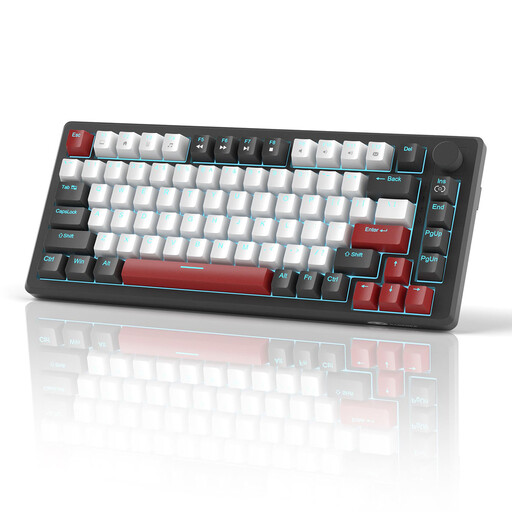
For the First-Time Buyer: MageGee STAR75

MageGee STAR75 75% Wired Mechanical Keyboard

Why It Stands Out: The MageGee STAR75 is an excellent entry point into the world of mechanical keyboards. It delivers a premium feel without a high price tag. The 75% keyboard layout is a smart compromise, saving desk space while keeping dedicated arrow keys and a full function row. It comes equipped with smooth linear red switches, which are great for both gaming and typing. The inclusion of sound-dampening EVA foam and a multi-function control knob for volume and lighting are features often found on more expensive boards.

  • Pros:
    • Accessible price point for new users.
    • Compact and functional 75% layout.
    • Smooth linear red switches suitable for general use.
    • Integrated knob for convenient media and backlight control.
    • Internal foam for a quieter, more pleasant typing sound.
  • Who is it for?: Anyone looking for their first mechanical keyboard, including students, office workers and casual gamers on a budget.

For the Competitive Gamer: Redragon M68

Redragon M68 Magnetic Switch Mechanical Gaming Keyboard

Why It Stands Out: The Redragon M68 is built for one purpose: performance. This magnetic switch keyboard is engineered for the demands of competitive FPS games like Valorant and CS2. Its standout feature is Rapid Trigger technology, which allows for instant key resets and incredibly responsive movement. Combined with an 8000Hz polling rate, it delivers a near-instantaneous connection between your actions and the game. The sturdy aluminium top plate and compact 65% keyboard layout provide a solid feel and maximum room for your mouse.
  • Pros:
    • Magnetic switches with adjustable actuation (0.2mm to 4.0mm).
    • Rapid Trigger for a significant competitive advantage.
    • Ultra-fast 8000Hz polling rate for minimal input lag.
    • Durable build with an aluminium top plate.
    • Space-saving 65% layout ideal for FPS gamers.
  • Who is it for?: Serious and competitive gamers who prioritise speed, responsiveness and a performance edge in fast-paced titles.

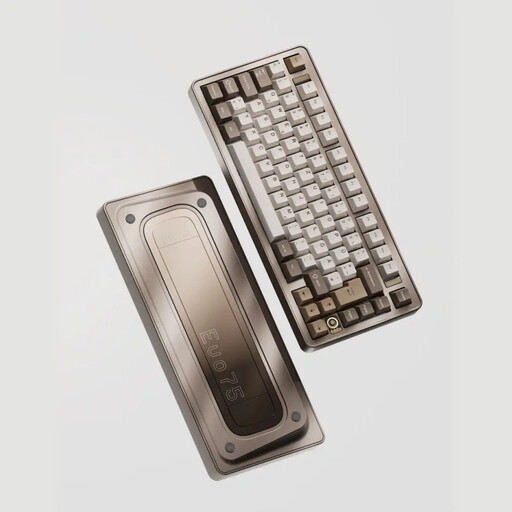
For the Customisation Enthusiast: Ticktype EVO75

Ticktype EVO75 Custom Tri-Mode Wireless Mechanical Keyboard

Why It Stands Out: The Ticktype EVO75 is a premium board for those who want complete control over their typing experience. As a fully-featured custom mechanical keyboard, it boasts a solid, full aluminium case and a leaf-spring mounting structure for a uniquely cushioned and flexible typing feel. It is a hot swappable keyboard, meaning you can easily change switches to match your preference. With tri-mode connectivity (wired, 2.4GHz and Bluetooth), it is a versatile wireless mechanical keyboard that fits any setup. Full VIA compatibility allows for deep, intuitive key remapping and macro creation.

  • Pros:
    • High-end full aluminium construction.
    • Hot-swappable PCB for easy switch customisation.
    • Versatile tri-mode wireless and wired connectivity.
    • Leaf-spring mount provides a comfortable, bouncy typing feel.
    • VIA compatible for powerful and user-friendly programming.
  • Who is it for?: Keyboard enthusiasts, programmers and professionals who value premium materials, deep customisation and a superior typing experience.

Looking for More Options?

These recommendations cover some of the most popular needs, but the right keyboard is a personal choice. If you are looking for a different layout, switch type or aesthetic, there are many other models to consider.

Explore our full range of desktop keyboards to find the perfect fit for your desk.

Frequently Asked Questions

1. Are mechanical keyboards better for gaming? For many gamers, yes. Mechanical keyboards offer faster and more reliable key actuation compared to typical membrane keyboards. They also feature N-key rollover, which ensures every keypress is registered, even when multiple keys are pressed at once. Advanced features like the Rapid Trigger found on a magnetic switch keyboard provide a measurable advantage in competitive play by allowing for faster character movement and counter-strafing.

2. What is a hot-swappable keyboard? A hot swappable keyboard has a circuit board (PCB) designed to allow you to pull out and replace the mechanical switches without any soldering. This is a highly sought-after feature for anyone interested in building a custom mechanical keyboard, as it lets you easily try different switch types (e.g., linear, tactile, clicky) to find the perfect feel or replace a faulty switch with minimal effort.

3. How loud are mechanical keyboards? The volume depends entirely on the switch type.

  • Clicky switches are intentionally loud, producing an audible click.
  • Tactile switches are much quieter, with just a small tactile bump.
  • Linear switches are generally the quietest of the three, as they have no click or bump. Additionally, keyboard construction plays a role. Models with internal sound-dampening foam, like the MageGee STAR75, are designed to reduce internal case noise for a quieter overall sound profile.