
24/7 Customer Support

Free returns

Same-day & Next-day Delivery

Quality Guaranteed

Unlock Your Welcome Offers: FREE Delivery | Up to 80% OFF | Free 30-day JoyPlus trial
Download the APP
As a Joybuy Product Recommendation Officer, I see a common goal among UK drivers: a cleaner, more convenient car interior. The tangle of charging and data cables around the gear stick is a frequent complaint. A wireless CarPlay adapter seems like the perfect solution, promising to automatically connect your phone for navigation, music and calls the moment you start the engine.
However, the market is flooded with options, and not all are created equal. Many drivers, in their rush to cut the cord, fall into a few common traps that lead to frustration and wasted money. Before you buy, let's look at the critical mistakes to avoid.
The most common complaint about low-quality adapters is a flaky connection. You are halfway through a critical turn on the M25, and your navigation suddenly freezes. Or your favourite podcast cuts out intermittently. This is often due to outdated wireless technology. Many cheaper units use a crowded 2.4GHz Wi-Fi band and older Bluetooth versions, which are prone to interference and dropouts, especially in busy urban areas.
A device might be advertised as universally compatible, but the reality can be a compatibility headache. You might find it doesn’t work with your specific infotainment system, like a 2021 Ford with SYNC 4 or a Volkswagen with the MIB3 system. This often results in a device that simply fails to connect, or one that loses key functions like steering wheel controls.
A poorly designed adapter can become surprisingly hot during use, particularly on long journeys or warm days. This overheating can cause performance to throttle, leading to lag, or even cause the device to shut down entirely. Another frustration is a slow boot-up time; if you have to wait 30-60 seconds for the adapter to connect after starting your car, it defeats the purpose of a seamless, plug and play CarPlay experience.
To avoid these issues, focus on a few key technical specifications. These non-negotiable features are what separate a reliable device from a frustrating one.
For a stable, high-performance connection, the adapter must have the right wireless hardware.
Do not rely on vague claims of "98% compatibility". Before purchasing any wireless CarPlay dongle, verify that it explicitly lists your vehicle's make, model, year and, most importantly, its infotainment system name (e.g., Uconnect, MyLink, MMI). Reputable brands provide detailed compatibility lists. Equally important is checking compatibility with your phone's operating system (e.g., iOS 10+ or Android 11+ for a wireless Android Auto adapter).
Check the data port in your car. While most cars from 2017-2023 use a standard USB-A port, many newer 2024-2026 models from brands like VW and Toyota have switched to USB-C. Ensure the adapter you choose either has the correct native plug or comes with a high-quality CarPlay USB C adapter included in the box.
We have filtered through the options to match specific products to different user needs. This approach ensures you get a device that not only works but is genuinely suited to how you use your vehicle.

Why This Fits Their Persona: This user's primary goal is to convert wired CarPlay to wireless with a set-and-forget solution. They value reliability and want their in-car tech to work automatically without any fuss, retaining full use of their car's original touchscreen and steering wheel controls.
It directly counters the connection pitfall by using 5.8GHz Wi-Fi and Bluetooth 5.2. It also avoids the compatibility myth with a clear, extensive list of supported vehicles and includes a USB-C adapter, making it a safe choice.
Supports both Apple CarPlay and Android Auto in one device. The Linux-based OS provides high stability, and it supports over-the-air firmware updates for future-proofing.
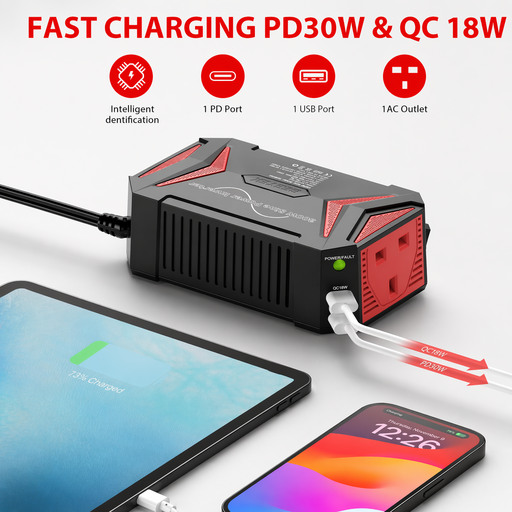
Why This Fits Their Persona: This user treats their car as a mobile office. Beyond just phone connectivity, they need to power a laptop for a client meeting, charge camera batteries between shoots or run other small electronics that a standard USB port cannot handle.
It avoids the trap of cheap, modified sine wave inverters that can damage sensitive electronics. This unit provides pure sine wave AC power, which is safe for laptops and other complex devices. It also has built-in safety protections against overheating and short circuits.
Provides a standard UK 3-pin socket (230V) in your car, plus modern fast-charging ports including a PD 30W USB-C and a QC 18W USB-A. The intelligent cooling fan keeps noise to a minimum.
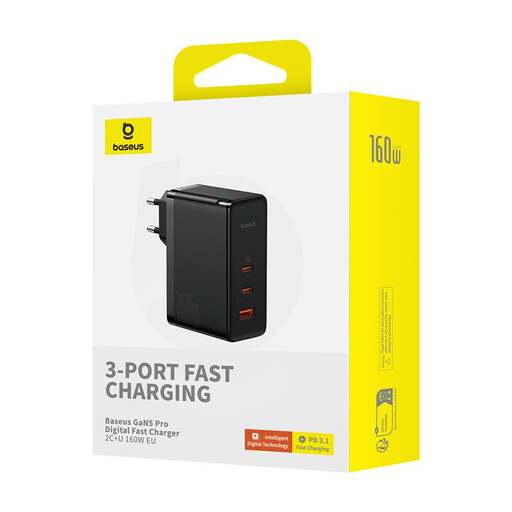
Why This Fits Their Persona: This user is preparing for a family road trip. They need to charge two smartphones, a tablet for the kids and maybe a laptop or portable game console, all at the same time. A single, slow USB port in the car simply won't suffice.
It solves the problem of slow charging and insufficient ports. Instead of a mess of cheap, inefficient chargers, this single unit uses advanced GaN (Gallium Nitride) technology to deliver high power efficiently and with less heat, protecting your devices.
A massive 160W total power output can fast-charge multiple demanding devices simultaneously. The digital display provides a real-time readout of the power being delivered, and it comes with a high-quality 240W USB-C cable.
To ensure you have the right connections for these new devices, from a CarPlay USB C adapter to other essential converters, having the correct cables and adapters is key.
We have compiled a complete, real-time list of products that fully satisfy these strict selection criteria and UK safety regulations.
A well-designed adapter is made to enter a low-power standby mode or shut off completely when your car's ignition is turned off. The power draw in this state is minimal and should not drain a healthy car battery. However, it is wise to confirm that your vehicle's data USB port is not "always on".
The lifespan depends on the build quality. A quality unit with good internal components and effective heat dissipation should last for several years. Models that support FOTA (Firmware-Over-The-Air) updates, like the Ottocast adapter, have an advantage, as they can be updated to maintain compatibility with new phones and operating system versions, extending their useful life.
Absolutely. As more car manufacturers adopt USB-C, adapter makers are responding. You can either find a wireless CarPlay dongle with a native USB-C connector or, more commonly, one that includes a certified USB-A to USB-C adapter in the package. Always check the product description to ensure the necessary adapter is included to avoid a separate purchase.