
24/7 Customer Support

Free returns

Same-day & Next-day Delivery

Quality Guaranteed

Unlock Your Welcome Offers: FREE Delivery | Up to 80% OFF | Free 30-day JoyPlus trial
Download the APP
Modern laptops, from MacBooks to the latest Dell XPS and Surface models, are wonderfully sleek and portable. However, this slim design often comes at the cost of connectivity, leaving you with just one or two USB-C ports. If you've ever found yourself needing to connect an external monitor, a wired keyboard and a USB stick all at once, you understand the challenge.
A USB C hub, also known as a multiport adapter, is the straightforward solution. It expands a single USB-C port into a versatile array of connections, transforming your laptop into a fully-fledged workstation. This guide is designed to help you navigate the options and find a hub that fits your specific needs, whether you're working from home, in the office or on the move.
Before diving into our recommendations, consider these key factors to ensure you select the right device for your setup.
The primary function of a hub is to give you back the ports you need. Take a moment to list the devices you use daily.
dual monitor adapter USB C with two HDMI ports is essential. Check the supported resolution and refresh rate (e.g., 4K@60Hz) to ensure a smooth visual experience.USB C hub with HDMI and Ethernet provides a dedicated RJ-45 Ethernet port for a reliable link to your network.Many modern laptops charge via their USB-C port. A USB C hub with power delivery allows you to charge your laptop through the hub itself, using the same port. This is called "pass-through" charging. It's vital to check the hub's maximum power output (measured in watts, e.g., 85W or 90W) to ensure it can adequately power your laptop while also running all connected peripherals. Using your laptop's original charger with the hub is often a good practice.
Think about where you'll be using your hub most.
Type C hub is ideal for hybrid workers, students and frequent travellers. These are lightweight and designed to be easily packed away.laptop docking station might be more suitable. These often offer more ports and higher power capabilities, creating a permanent "dock" for your laptop.Here are a few standout USB C hubs that cater to different user needs, from the travelling professional to the power user with a complex desk setup.
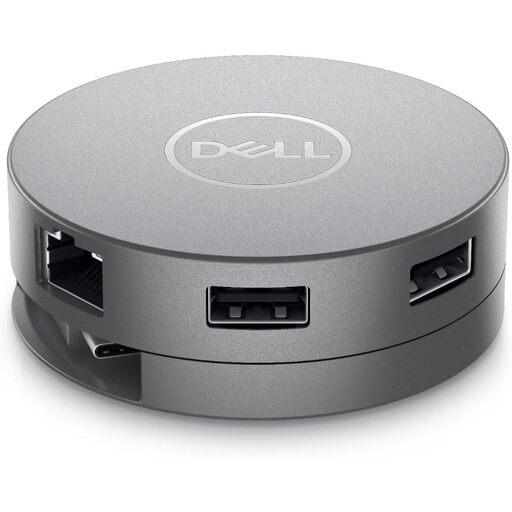
Why It Stands Out: The DELL DA310 is engineered for portability. Its unique, compact puck shape features an integrated cable that neatly tucks away, making it exceptionally easy to carry. It offers a comprehensive range of video outputs, including HDMI, DisplayPort and even VGA for connecting to older projectors or monitors.
Pros:
Who is it for? This is an excellent choice for the professional on the go. If you move between different offices, client sites or co-working spaces, the DA310's compact design and wide range of display options provide maximum flexibility.

Why It Stands Out: The Baseus 10-in-1 hub is a true powerhouse, built for demanding, high-performance setups. Its standout feature is the advanced dual HDMI display capability, with one port supporting up to 4K@120Hz—ideal for high-refresh-rate monitors used in gaming or video editing. It also boasts incredibly fast 10Gbps USB-A and USB-C data ports.
Pros:
Who is it for? This hub is aimed at power users. Content creators, video editors, programmers and gamers who need to drive high-resolution, high-refresh-rate dual monitors while transferring large files will find this hub meets their performance demands.
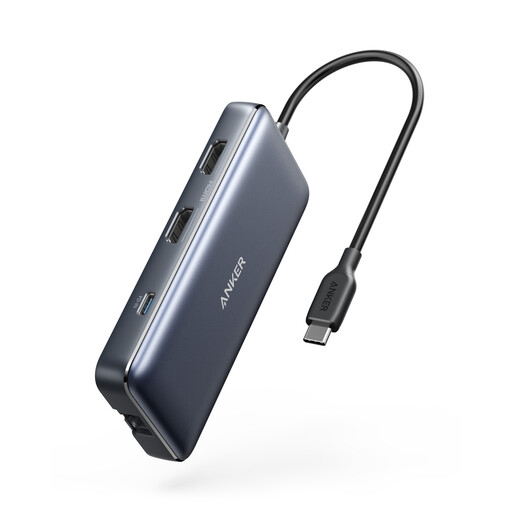
Why It Stands Out: The Anker PowerExpand 8-in-1 strikes a fantastic balance between comprehensive features and a streamlined design. It’s a reliable all-rounder that covers all the essential bases for a modern work or home setup, including dual HDMI display support and pass-through charging, making it a popular USB C adapter for MacBook and other compatible laptops.
Pros:
Who is it for? This hub is perfect for the versatile user—someone working from home, a student with a multi-monitor desk setup or a hobbyist photographer. It provides a robust and reliable set of features that cater to the most common connectivity needs without being overly complex.
If the hubs above don't quite match your requirements or if you're interested in exploring more powerful desktop solutions, we have a wider range available.
? Explore our full collection of USB C Docking Stations
A hub from a reputable manufacturer is designed to work safely with your devices. It's important to use a hub that supports the correct power delivery for your laptop. Using the charger that came with your laptop to power the hub is generally a safe practice. Avoid using uncertified, low-quality hubs, as they may not have the necessary protective circuitry.
No, not all USB-C ports are created equal. For a USB-C port to transmit a video signal, it must support DisplayPort Alternate Mode (DP Alt Mode). Most modern high-end laptops (like MacBook Pro/Air, Dell XPS and Microsoft Surface) have ports that support this, but it's always wise to check your laptop's specifications to confirm compatibility before purchasing a hub for video output.
A USB C hub with a Gigabit Ethernet port should not slow down your internet. In fact, it typically provides a faster and more stable connection than most Wi-Fi networks, which is ideal for video conferencing, online gaming and downloading large files. The performance is dependent on your internet plan and network hardware.