
24/7 Customer Support

Free returns

Same-day & Next-day Delivery

Quality Guaranteed

Unlock Your Welcome Offers: FREE Delivery | Up to 80% OFF | Free 30-day JoyPlus trial
Download the APP
Juggling files between a new USB-C laptop, an Android tablet and your iPhone 15 can quickly become a chore. Relying on cloud services to transfer large 4K video files or sensitive work documents isn't always practical, especially with slow Wi-Fi or data privacy concerns. This is where a modern storage solution becomes essential.
A dual USB C flash drive offers a straightforward and powerful way to bridge the gap between your devices. Featuring both the newer USB-C and the traditional USB-A connectors, these drives provide universal compatibility and high-speed performance. As your Joybuy Product Recommendation Officer, my goal is to help you navigate the options and find a drive that genuinely solves your storage problems. This guide will outline key features to look for and present a few carefully selected recommendations.
Selecting the right drive goes beyond just picking the largest capacity. Consider these factors to ensure your choice meets your specific needs for speed, durability and security.
Not all flash drives are created equal. A standard USB 3.2 flash drive is perfectly adequate for everyday file transfers, but for more demanding tasks, you may need more power. If you're a creative professional editing 4K video, a gamer loading titles or a power user moving gigabytes of data, look for an SSD flash drive. These drives use internal components similar to a computer's solid-state drive, delivering significantly faster read and write speeds that can save you valuable time.
A drive that travels with you needs to be durable. A metal USB drive, typically made from zinc or aluminium alloy, offers superior protection against drops and knocks compared to plastic alternatives. Metal casings also help dissipate heat during prolonged high-speed transfers. Equally important is its dual-interface design, which ensures it works as an Android OTG flash drive for quick mobile backups and as a flash drive for iPhone 15, which now uses the USB-C standard.
If you handle sensitive client information, financial records or personal data, an encrypted flash drive is a wise investment. These drives use hardware-based encryption, such as AES-256, to protect your files. Some advanced models even include biometric fingerprint scanners, ensuring that only authorised users can access the contents, even if the drive is lost or stolen.
Based on the criteria of performance, build and features, here are our recommendations for 2026.
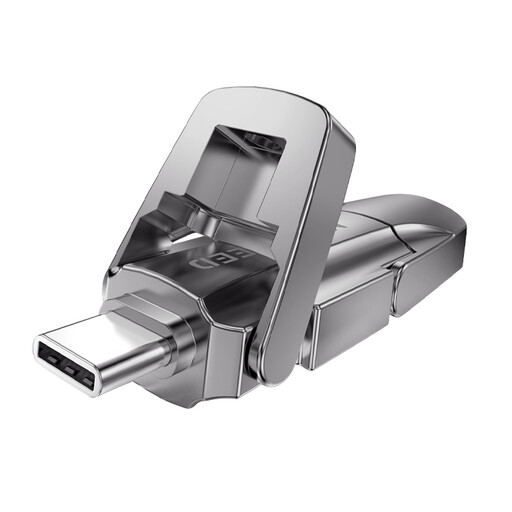
Why It Stands Out: This drive is built for pure speed. With read speeds of up to 1090MB/s, it performs more like a portable SSD than a traditional thumb drive. It's designed for professionals who need to transfer massive files, such as 4K ProRes video, in seconds rather than minutes.
Pros:
Who is it for? Video editors, photographers and tech enthusiasts who require the fastest possible transfer speeds for their high-performance workflow.

Why It Stands Out: The DigiEra LUS320 strikes an excellent balance between performance, design and practicality. Its 360° swivel mechanism means there's no cap to lose, and the compact metal body ensures it can withstand daily use. With read speeds up to 500MB/s, it's a significant step up from basic drives.
Pros:
Who is it for? Students, office workers and general users looking for a reliable and convenient USB C memory stick for everyday file transfers and mobile backups.
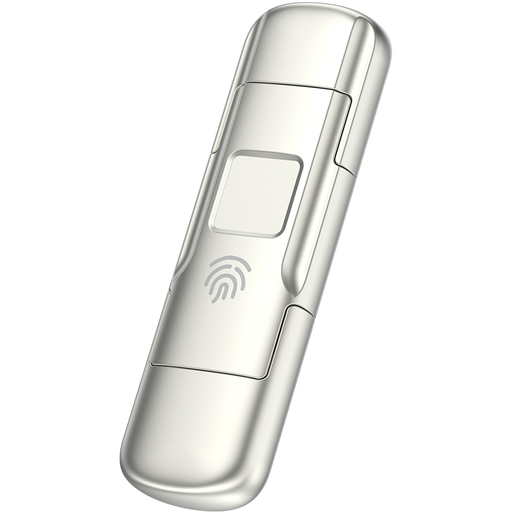
Why It Stands Out: This drive puts security first without compromising on speed. It combines fast, SSD-level performance with AES-256 hardware encryption and a built-in fingerprint reader. This makes it an excellent choice for protecting confidential business data or sensitive personal files.
Pros:
Who is it for? Business professionals, legal and financial workers or anyone who needs to transport sensitive information securely on a 256GB USB C drive.
While these three drives cover a range of common needs, your ideal solution might require a different capacity, form factor or feature set. If you're searching for something specific, we invite you to browse our complete collection.
Explore our full range of USB Type-C storage solutions to find the perfect match for your devices.
Can I use a dual USB C flash drive with my iPhone 15? Yes. The iPhone 15, 15 Plus, 15 Pro and 15 Pro Max all feature a USB-C port. This allows you to connect a dual USB C flash drive directly to transfer photos, videos and other files, making it an excellent flash drive for iPhone 15 users who want to back up data without relying on a computer or the cloud.
What is the difference between a normal flash drive and an SSD flash drive? An SSD flash drive uses higher-grade NAND flash memory and a more advanced controller, similar to what's inside an internal solid-state drive. This results in dramatically faster read and write speeds compared to conventional flash drives. While a standard drive is fine for documents, an SSD-level drive is better for transferring large media files or running portable applications.
Do I need special software for an encrypted flash drive? Most modern encrypted flash drives, particularly those with fingerprint sensors, are designed for ease of use. The initial setup, such as registering your fingerprints, may require running a small application stored on the drive itself. After that, unlocking the drive is as simple as plugging it in and placing your finger on the sensor—no extra software is needed for daily access.