Dark-room console players
PS5 and Xbox players who want controls they can find and use comfortably in low light, without compromising compatibility with their console and game.


Choose for your game and main device before considering lighting: DualSense is the direct standard-controller route for PS5, while the Xbox Wireless Controller suits Xbox players who also use supported PCs or mobile devices. For Windows and Android, the 8BitDo Ultimate 2C Wireless offers a different set of connections and controls; if a dark-room glow matters, check what an RGB controller actually illuminates and whether a wired setup works for you.
PS5 and Xbox players who want controls they can find and use comfortably in low light, without compromising compatibility with their console and game.
Players choosing between supported wired, wireless and Bluetooth connections, who may also want controls they can map to frequently used actions.
Players who find a conventional hand-held layout difficult or tiring and want to assess configurable input placement, alternative caps or external switches.
Start with your game and main device, then decide whether low-light visibility, game-supported feedback or an adaptable layout will make the greater difference to your play.
| Concern | What to check | Who this matters to |
|---|---|---|
| Platform and game support | Check the exact console or device, the game’s controller support and the required connection method. | If I switch between devices, I need to know that the controller works with the one I will actually use for this game. Around 36% of consumers put that match first. |
| Low-light use | Check which parts light up and whether the controls you need can be identified without relying on illuminated labels. | In a dark room, I want to locate the controller and find unfamiliar controls without interrupting play; roughly 29% of consumers make low-light use their primary concern. |
| Feedback and controls | Check game support for feedback features and whether extra controls or a particular connection suit your play. | When movement and combat call for frequent inputs, I care most about how the available controls fit those actions. About 21% of consumers prioritise feedback and control options. |
| Comfort and adaptable layout | Consider reach, grip and fatigue; for a PS5 Access setup, check the layout and any external controls needed. | If a standard layout makes inputs difficult or tiring, I need controls I can position and configure to suit me. For around 14% of consumers, adaptability comes first. |
PowerA describes lighting zones on its Lumectra controller, but that does not establish that its face-button labels light up. A glowing shell may still leave an unfamiliar layout hard to identify.
Check product images or instructions for the exact illuminated areas and consider whether you can distinguish the controls by touch.
Sony states that advanced feedback depends on game support; on PC, DualSense haptic feedback requires USB.
Check the intended game’s feature support and the connection needed on your device before choosing for those effects.
PS5, Xbox and Windows-and-Android controller routes are not interchangeable. Lighting or extra buttons will not resolve a mismatch with your main device.
Confirm the exact platform and game first, then compare features among controllers that fit them.
GOV.UK advises that unwanted electrical products and batteries should go through appropriate collection routes rather than household rubbish.
Look for a local electrical-waste or battery collection point, or ask about retailer take-back when replacing a controller.
DualSense is Sony’s standard PS5 controller; the Access controller provides a configurable PS5 input route.
The Xbox Wireless Controller is an official route for Xbox consoles and listed PC and mobile devices.
The Ultimate 2C Wireless is a Windows-and-Android option with different connection methods for those devices.
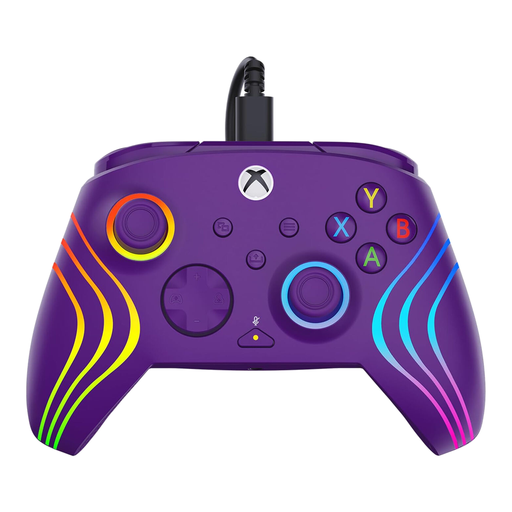
The Advantage Wired Controller with Lumectra is an Xbox-and-Windows option for players who specifically want controller lighting.
These controllers offer Xbox, PS5 or PC routes for the dark-room gaming scenario. Choose by your device and game first; if lighting is important, check which controls are visible rather than relying on an RGB description alone.
 No image available
Consider this wired Xbox controller if a cable suits your setup and you want to check its lighting for dark-room play.
Confirm support for your game and whether the controls you need are visible in low light.
 No image available
This Xbox and PC option suits players considering RGB lighting who can accommodate a wired controller.
Check the lighting areas, your game’s controller support and whether the cable will reach your playing position.
 No image available
This is the standard PS5 route if you want to use DualSense features in a game that supports them.
Sony states that haptic feedback and adaptive triggers depend on game support, and PC haptic feedback requires USB. Check control visibility separately for dark-room use.
 No image available
Consider this modular controller if you play on PlayStation and want to choose a control layout that suits your inputs.
Check the included configuration, game and device compatibility, and how easily you can identify its controls in low light.
 No image available
Consider this Xbox controller if adjustable controls matter more to you than decorative lighting.
Confirm compatibility with your exact Xbox model or PC and intended game before buying; also check whether its controls are easy for you to locate in the dark.
Not necessarily: PowerA describes lighting zones on its Lumectra controller, not illuminated labels on every button. Check which parts light up on the specific model and whether you can identify the controls by touch.
Yes, DualSense can connect to a supported Windows PC by USB-C or Bluetooth, according to Sony. Check the game’s support for the features you want: PC haptic feedback requires USB, and adaptive triggers require game support.
Xbox lists Android and iOS alongside Xbox consoles and Windows PC as supported device routes. Check your phone, game and connection method before choosing it for mobile play.
Sony’s Access controller offers configurable PS5 inputs, alternative caps and connections for compatible external controls. Work out which game actions you need to reach and whether your preferred layout requires additional controls or a combined DualSense setup.
Use an appropriate electrical-waste collection route rather than putting an unwanted controller in household rubbish, as GOV.UK advises for electrical products. Check local battery-collection guidance if the battery is removable.